
From a crude sketch to a working Android app
What building with AI taught me about leading design
Overview
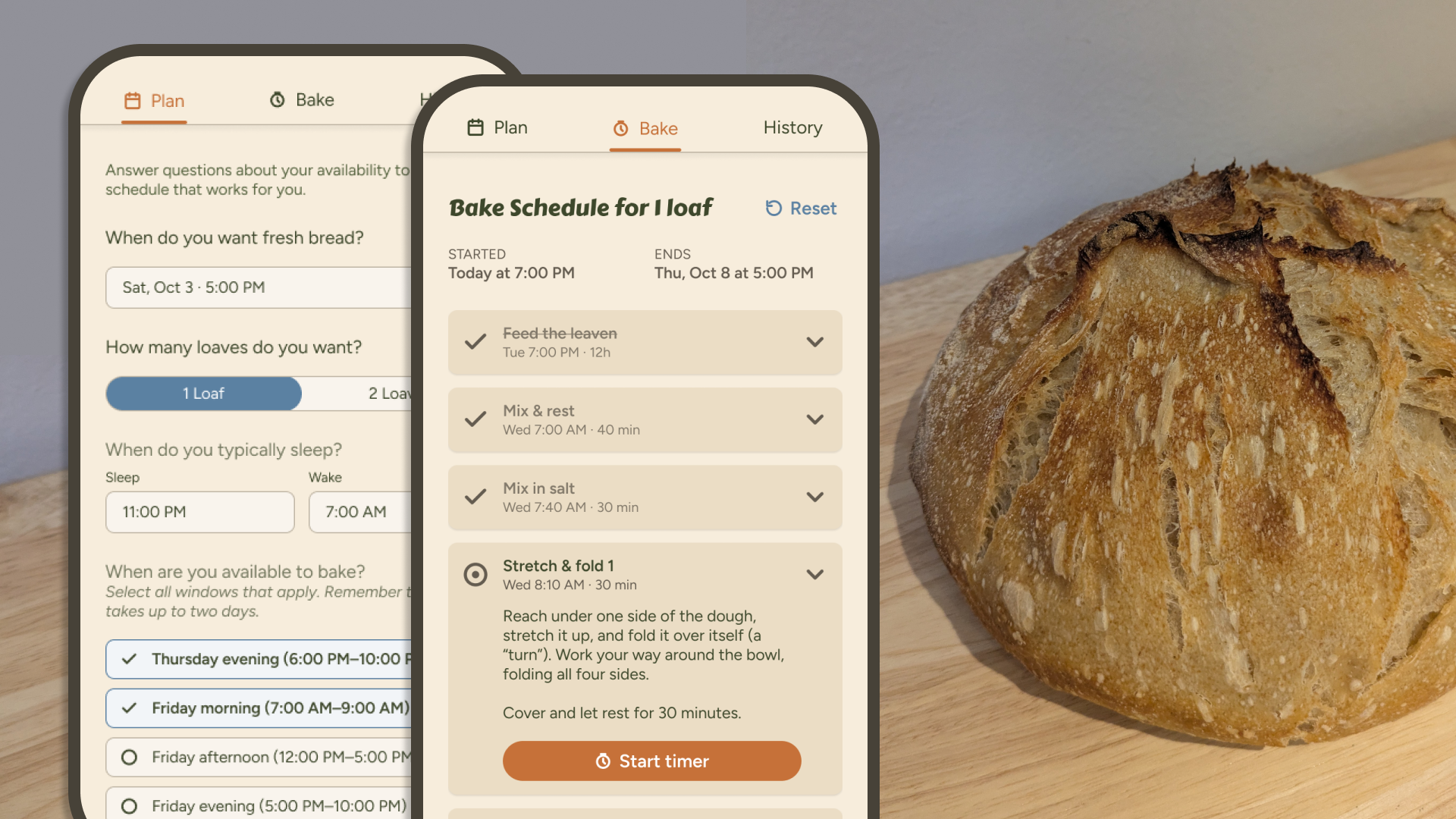
I set out to solve two problems: making sourdough easier to plan and bake, and figuring out where AI really fits in the design workflow. The result is a working Android app that I use for every bake, now live on the Google Play Store.
The biggest lesson: AI tools plus my own skills built the app, but feedback from real people is what made it right.
Role
Founder, designer, and engineer
Timeline
~1 month, from sketch to coded app
Platform
Android, live on Google Play
Tools
Claude, Claude Code, Antigravity, Supabase, Figma
The problem
A 36-hour recipe that ignores your schedule
Earlier this year, a friend gave me a baggie of sourdough starter and some verbal instructions on how to keep it alive. I'd never baked sourdough, so I did what most people do and Googled it. I was overwhelmed right away by how many steps there were, how much nuance each one had, and the fact that one bake takes more than 36 hours.
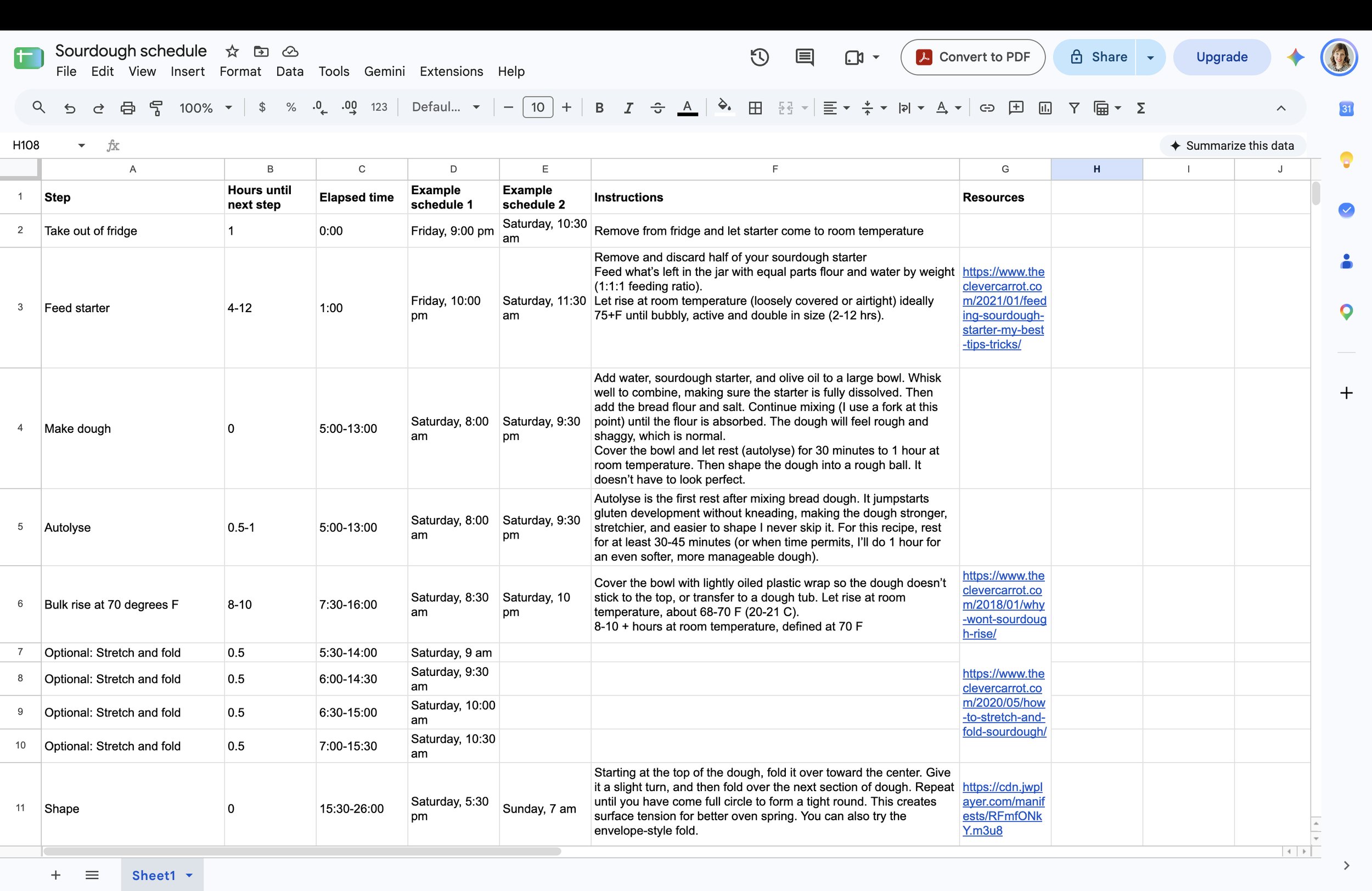
So I did what I always do with complexity: I built a spreadsheet. I plotted every step backward from a start time so I wouldn't be doing a fold at 2 a.m. It helped with timing, but once a bake started I still had trouble remembering what came next, and I was toggling between the spreadsheet, a recipe and a phone timer.
Experimenting with AI in a vacuum
At the same time, I had a professional goal to form a real point of view on where AI fits in product design. There were so many tools, and I didn't know which to use for what. I'd been experimenting, but experimenting in a vacuum only gets you so far. I needed a real problem to solve.
I think most design teams are in this same spot right now: curious and trying things, but without a structured path forward.
Two goals, one project
I realized one project could solve both problems, and I'd eat a lot of tasty bread along the way. My mission was to ship a real app end-to-end, using AI at every stage, with no mobile engineering background.
Product goal
Help home bakers plan a bake around their real schedule, then guide and time each step.
MVP
Scheduling around sleep and availability windows
Step-by-step recipe instructions
Step timers
Baking journal for notes and photos*
Professional goal
Find where AI genuinely improves the design and delivery process, and where it doesn't.
Even on a personal project, I scoped it the way I would at work.
Deferred
AI-powered personalization
Recipe customization
Deeper guidance for beginners
Constraints
A team of one
Limited mobile engineering knowledge
Android-only test devices
Self-funded
The process
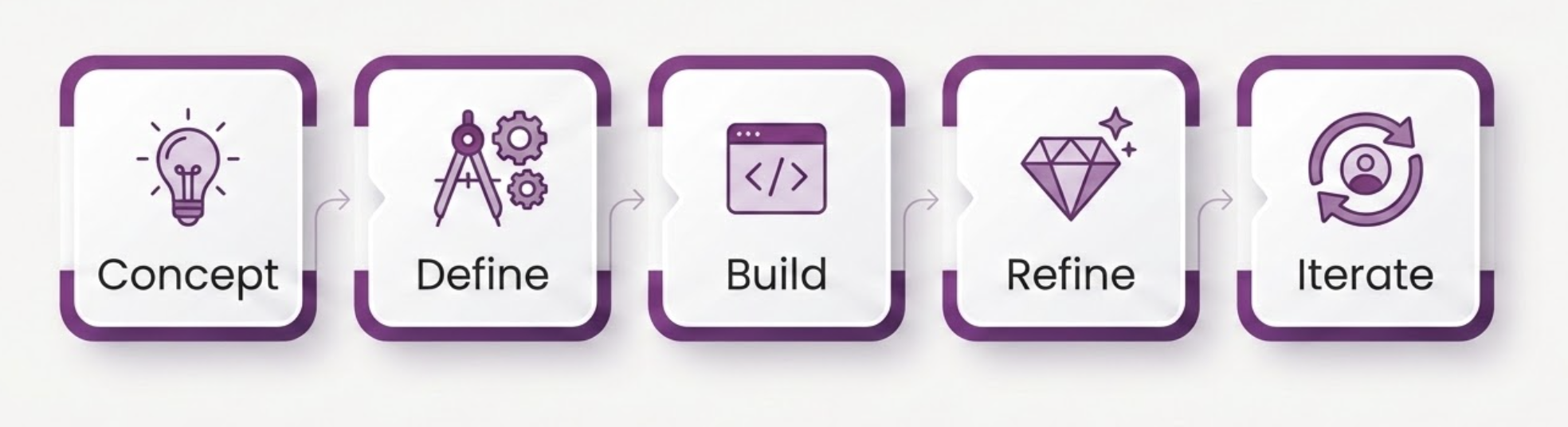
Concept: from sketch to pixels in an afternoon
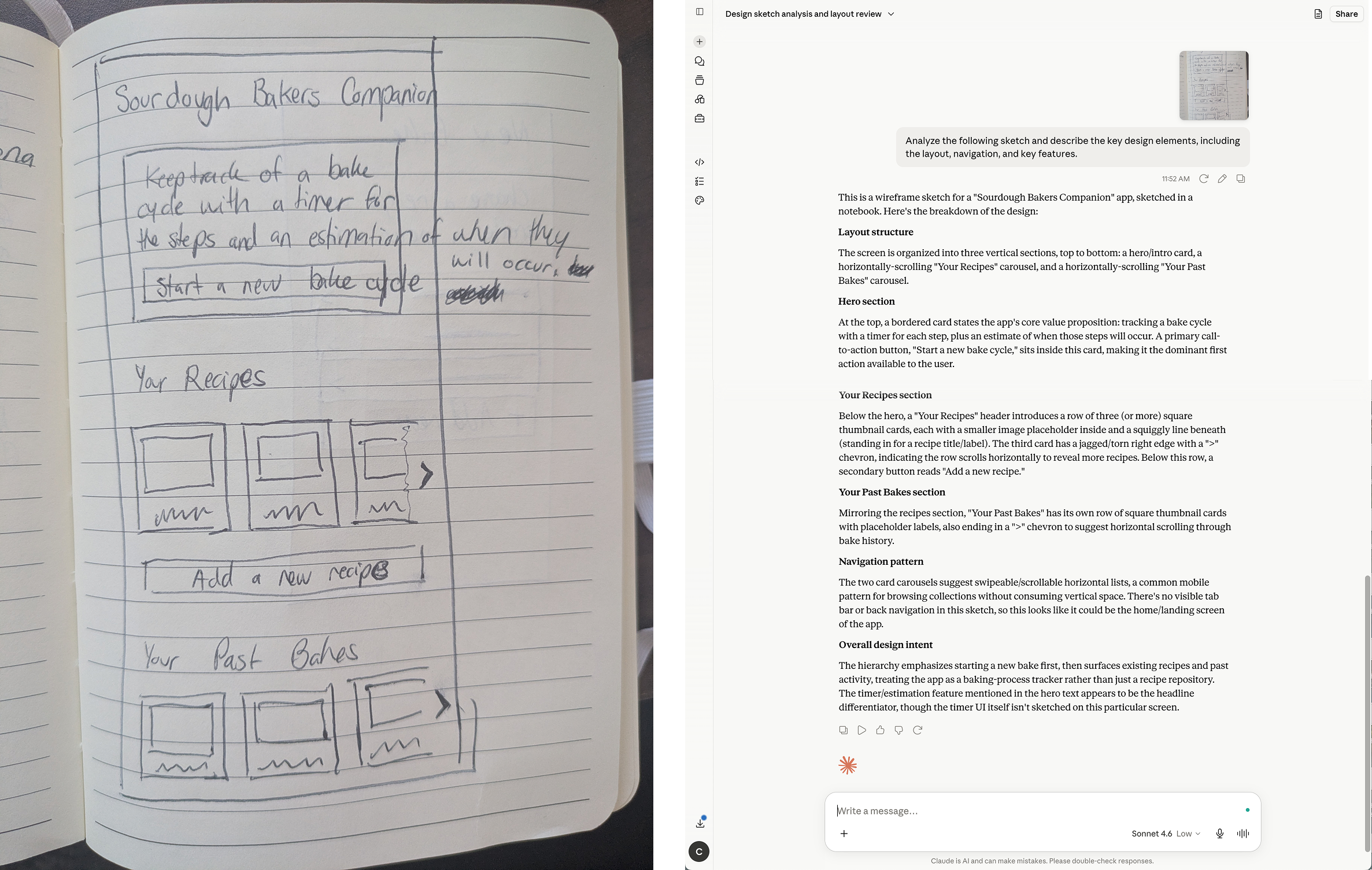
A Coursera course on generative AI for UX designers gave my experimenting some structure. The first assignment was to sketch an app idea and ask an AI tool to analyze it. I was skeptical, since my sketch was rough. But Claude correctly picked out the layout, the components, and even my scratchy handwriting. It felt like talking through an early concept with another designer.
I gave that analysis to Figma Make and asked for a wireframe. It wasn't perfect, but it got me from ink to pixels in an afternoon, and it flagged patterns I'd missed, like a tab bar and back navigation.
Build: shipping code with limited engineering experience
Many years ago I was a designer who wrote her own front-end code, but that doesn't make you an app developer. An online tutorial got me set up with Antigravity and Claude Code. From there I imported my designs, connected Supabase for user data and login, pushed the code to GitHub and released builds through the Play Console.
Claude quickly became a better teacher than the course. It worked like a collaborative engineering partner: it explained what was wrong, asked before trying fixes and sometimes caught bugs before I did. It wasn't all smooth. We couldn't get magic-link login to work across systems, so after several rounds of debugging I switched to emailed codes and kept moving. Knowing when to stop chasing a fix is a big part of shipping.
Prompts mattered.
My first request, "create variables for all text used in this project," produced more than 130 string variables. A more detailed prompt still missed. When I added an example from a typography tutorial, the agent gave me exactly what I needed. It's the lesson every designer already knows: clearer requirements produce better results.
Seamless design-to-dev handoff
Once the design was where I wanted it, I sent everything back to Claude to update the code and components and flag any mismatches. The handoff was nearly seamless, with no spec doc needed.
Define: AI as a strategy partner
Next, I wrote out the problem and my goals, then worked with Claude on a persona, a vision statement, and user stories. What stood out was that it asked clarifying questions before drafting anything, about whether users had a starter, their experience level and their schedule flexibility. That's just what a good designer would do.
The proto-persona and stories were a little generic, but good enough to start. I then grouped the features I wanted into two modes, plan and bake, and had Claude turn them into an interactive prototype.
Refine: AI as a design production assistant
I asked Claude to export the core screens into Figma. It recreated them and, without being asked, built a starter set of variables, components, and icons. From there, Figma's AI became my production assistant. In about a minute, it created a second icon size, swapped them in, and added white versions for orange backgrounds. It also built a secondary color ramp, multi-state buttons, and tab navigation.
Illustration was another story.
No AI tool could produce the character in my head, so I drew the hero loaf myself. Design isn't dead after all. But when I needed more illustrations for onboarding, AI was excellent at extending my style and palette, turning hours of illustration into under 30 minutes of fine-tuning.
Testing: people surfaced what AI couldn’t
At this point, I had an app that worked for me. But I know I'm not the user, even when I'm building to solve my own problem. So I ran a closed test with 12 people, who ranged from experienced bakers to my mom, with an equally wide range of tech savviness.
The planning model was backward
"Typically my constraints are when I'm home and awake. When I think about baking bread today, I am often working backwards from an end time, rather than forwards from a start time."
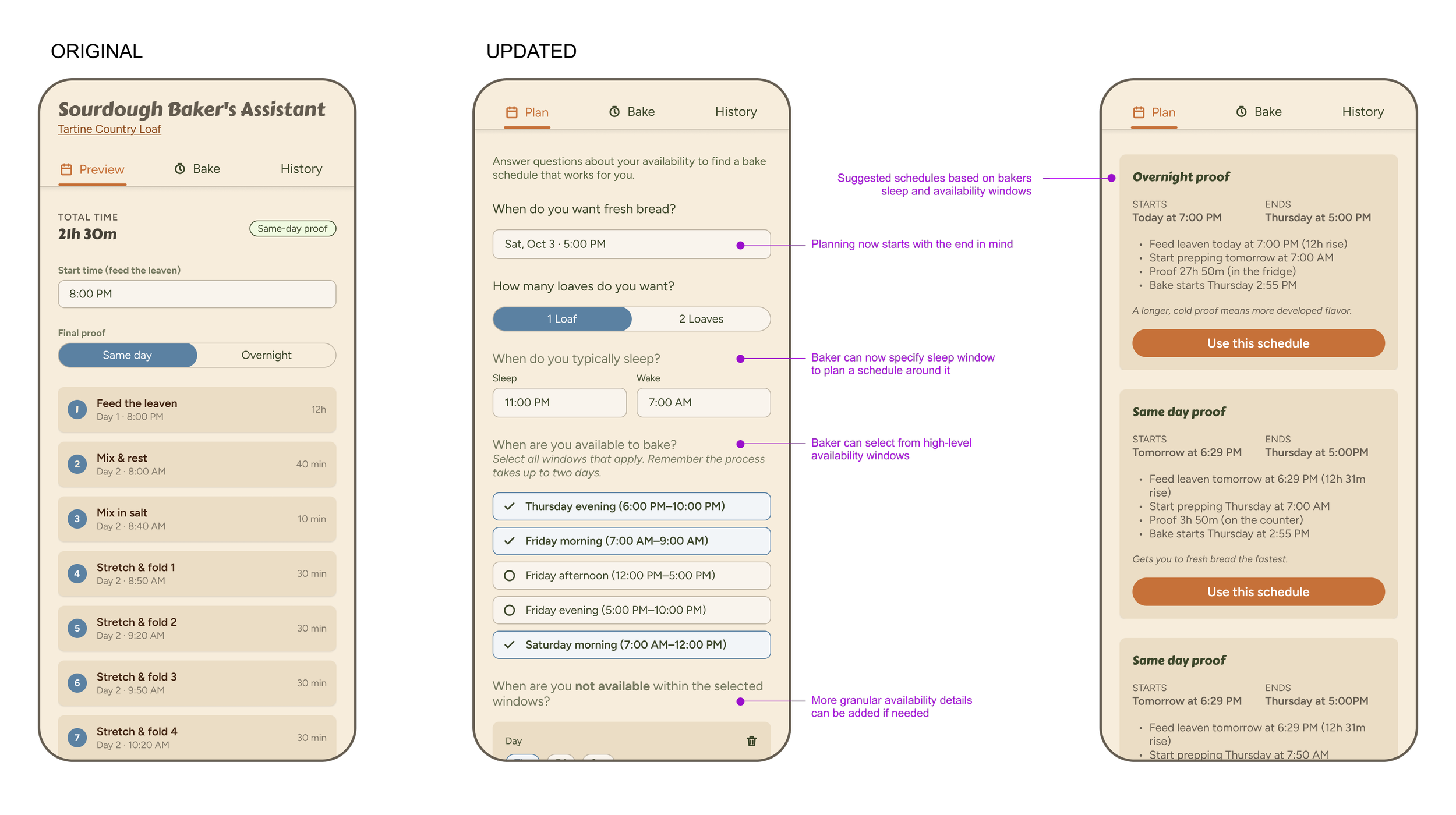
This reframed the whole product and exposed my anchoring bias toward the first tool I'd used. My app worked like my spreadsheet, where the user could pick a start time and project the schedule forward. What bakers really wanted was to plan around their lives, with the goal of having fresh bread on the table.
I summarized the feedback for Claude Code, explored a few approaches, and redesigned planning around the baker's sleep and availability, with flexible windows for the steps that can stretch. The logic got much more complex, and I spent a lot of time testing edge cases until it worked.
Deciding who the app is for
Making instructions scannable
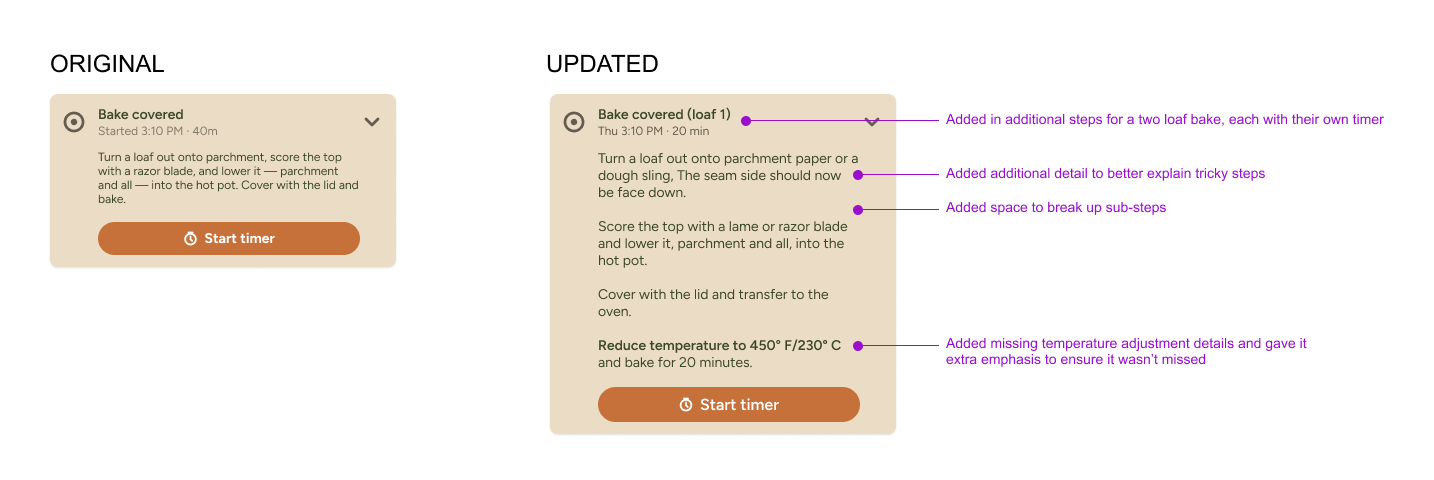
That tester missed the step to lower the oven temperature. Another had to look up what "autolyze" meant. So I applied the design fundamentals AI had skipped: plain language, more spacing, and type size and weight that make the key numbers stand out.
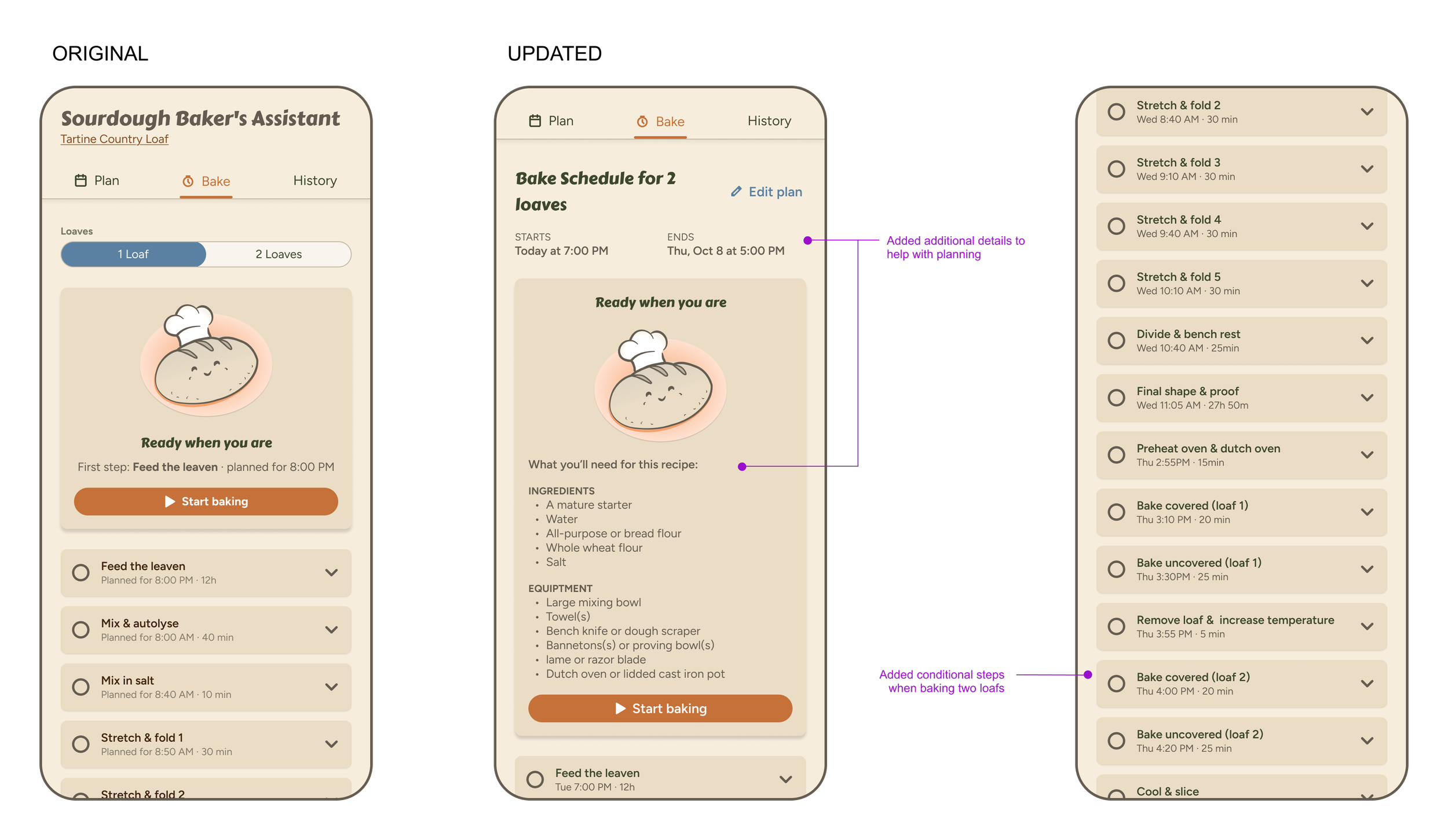
Testers also caught missing details I'd glossed over because I knew them by heart, like separate steps and timers for baking a second loaf. I added those, plus start and end times and ingredient and equipment lists so bakers can prepare ahead
Testing with my mom forced a bigger question. She'd never baked sourdough and didn't realize it takes a day and a half, so the Plan tab made no sense to her. I chose to optimize for bakers like me, who know the basics but need help with timing. I'd take easy wins for beginners and experts, but I wouldn't design for the extremes yet. Deciding who not to optimize for is as important as deciding who to serve.
"When I was skimming the instructions, I was specifically looking for numbers (temps and times), and when I didn't see any I just skipped right over the rest of the text."