Behind the Experience
From Preview to Plan: redesigning the planning to better fit around bakers’ schedules
One of the biggest pain points I was trying to solve with the app was planning my baking schedule so I wouldn’t have to get up in the middle of the night to complete a step. Before the app, I used a spreadsheet to figure out my bake schedule. I entered a start time and plotted each subsequent step based on the wait time between them. If the schedule didn’t work, I adjusted the start time until the other steps aligned with my schedule. The first version of the app followed the same paradigm, with the start time as the only editable field, generating a preview of the schedule.
As I kept baking, I realized the timing between some steps is flexible, especially the final proof, so I made step durations editable in the Preview tab. Unfortunately, this proved to be confusing, especially for new bakers who didn't know which timings were flexible and which weren't.
“I'm not sure I understand what the use case is for only being able to toggle step duration. Editing a recipe probably happens less frequently.”
Because the Preview tab also presented steps almost identically to the Bake tab, testers found it repetitive.
“There's not really a meaningful difference between the preview and the bake tabs. Seeing all the steps and then seeing all the steps again feels redundant.”
Then one tester pointed out that I was thinking about the process backward:
“I think you're onto something with the planning, but typically my constraints are when I'm home and awake. When I think about baking bread today, I am often working backwards from an end time, rather than forwards from a start time.”
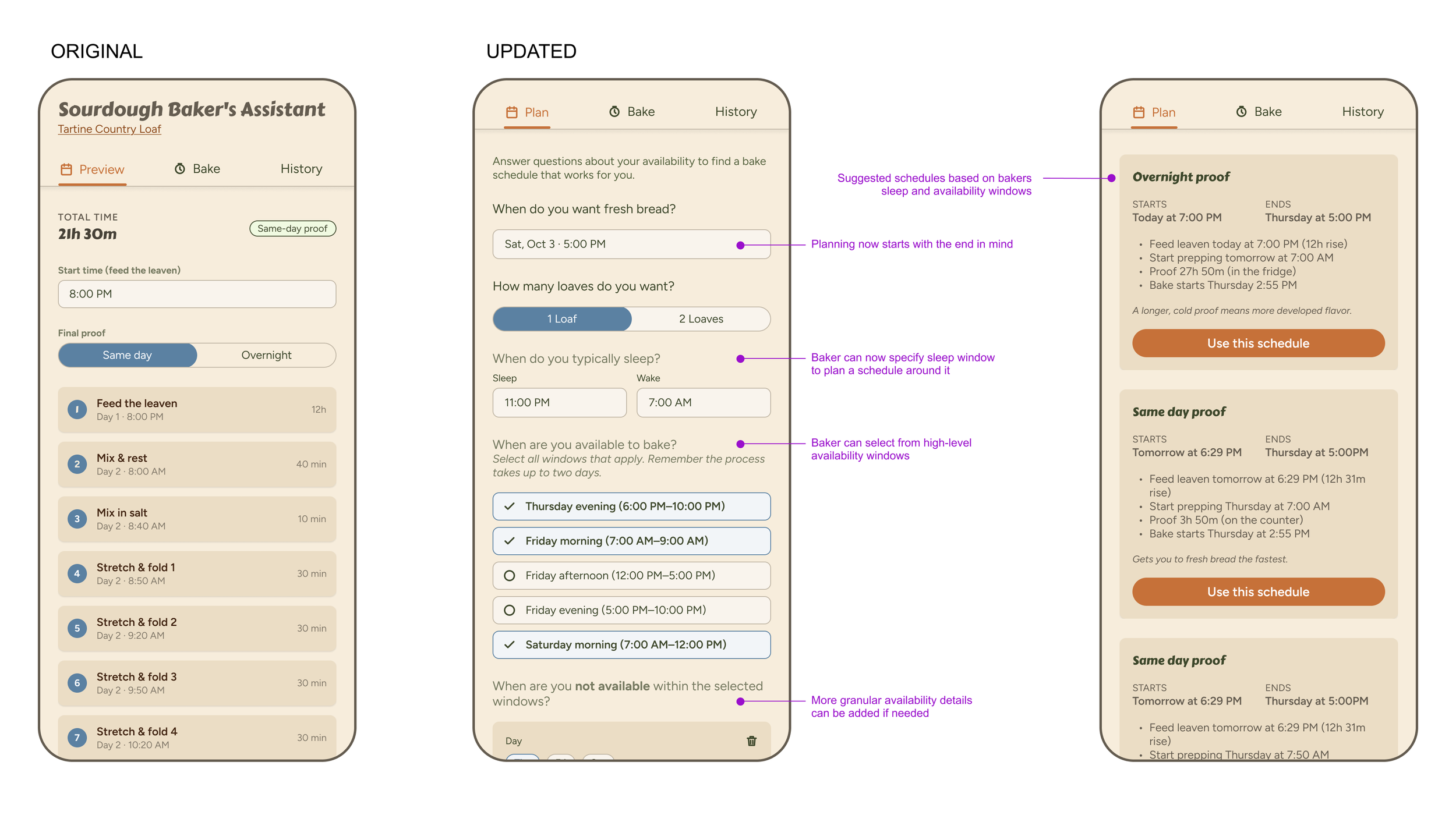
This reframed the whole planning problem. I dug deeper into this idea and started fleshing out how I could capture key details about a user’s schedule to create a better baking schedule. I also wanted to add more logic for where timing between steps was flexible, giving users more bake schedule options.
I went back to Claude Code, summarized this feedback, and asked for a few different approaches. We worked together to refine the concept and update the prototype, again laying out the functionality before moving the screens into Figma. There, I refined the visual design and wording before moving back into Claude to update the build and check for bugs. This new planning workflow proved much more complicated, with multiple variables and pieces of logic working at once. I went back and forth with Claude, testing edge cases, reporting bugs, and cleaning up the logic until everything worked smoothly.
Refining the target persona
Then I tested with my Mom. She didn’t get it. Since she had never baked sourdough bread and didn’t realize that the process can take over a day and a half, she completely missed the point of the plan tab. At that point, I needed to ask myself who I was designing the app for. I knew it wasn’t just for me, but was it targeting everyone from complete novices to expert bakers, or a smaller set of personas in between? I knew designing for total beginners would require much more hand-holding and education, something I wanted to explore in the future, but it wasn’t in scope right now. I also knew that catering to expert bakers would require a whole different level of detail and specificity. For now, I decided to optimize the app for someone like me, someone who understands the basics but needs help with planning and timing. If there were simple ways to make the app friendlier to beginners or pros, I'd take them, but I wouldn't go out of my way to optimize for either extreme.
Making content more scannable and accessible
One easy win for beginners was making the text-heavy recipe instructions easier to scan, using design fundamentals like information hierarchy, spacing, and varied font sizes and weights.
“For the "Bake Uncovered" section, I missed the instruction to lower the oven temperature... When I was skimming the instructions, I was specifically looking for numbers (temperatures and times) and when I didn't see any just skipped right over the rest of the text.”
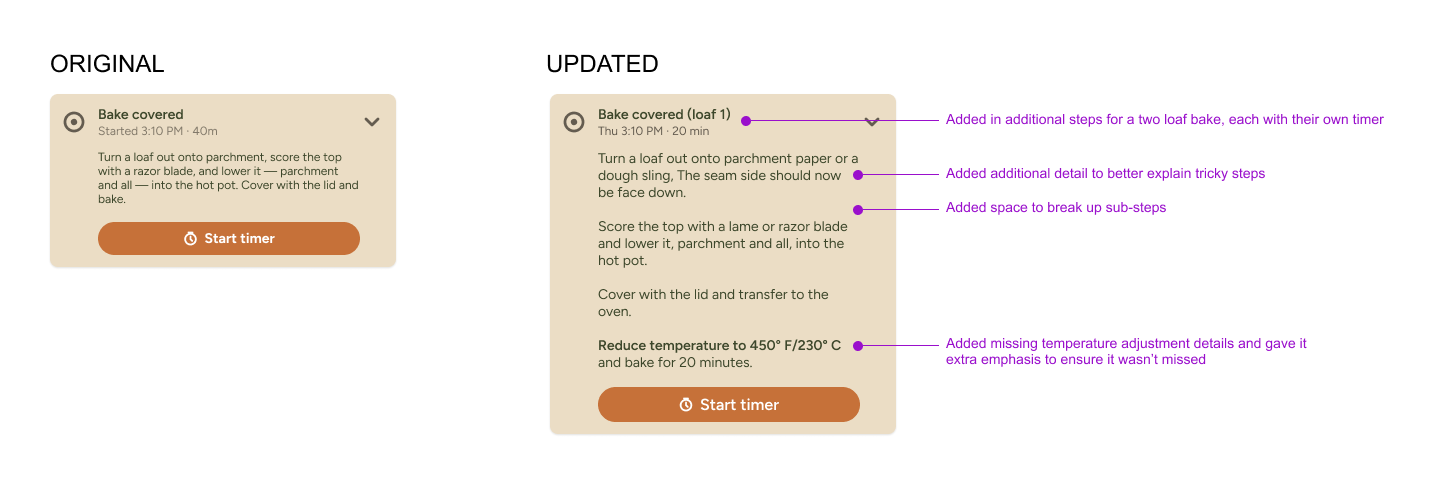
I also removed unnecessary labels and descriptions and simplified jargon that wouldn’t make sense to beginners.
“The app seems to assume a certain level of familiarity and understanding of sourdough terminology, which I definitely do not have as a beginner! I had to Google what "autolyse" meant.”
Catching bugs and missed details
One of the best parts of testing is getting a fresh pair of eyes on your work. As a designer, it is easy to go heads down and develop tunnel vision, missing obvious details because you are so used to looking at the design. On a cross-functional team, those things usually get caught before release by other designers in a design review, PMs during refinement, or engineers as they build. Yet when working alone with AI, the process can quickly become an echo chamber. That’s why I firmly believe that while AI can be a powerful tool to speed up our individual workflows, we still need other humans to lend their expertise and act as a sounding board.
App size is a good example. An Engineer friend pointed out that the app package seemed unusually large for what it was, and there was probably an opportunity to refactor it. As a non-app developer, I wasn't measuring app size, but I realized it affected download speed, so I knew I needed to reduce it. When I asked Claude Code about reducing the file size, it suggested enabling R8 code shrinking, but it explained that it required a config change, a rebuild, and testing, since it can trip up edge cases. That felt heavy and risky. Is it worth it? I don't know, and this is exactly where an engineer's expertise would come in handy. Any engineers reading this, please help me out!
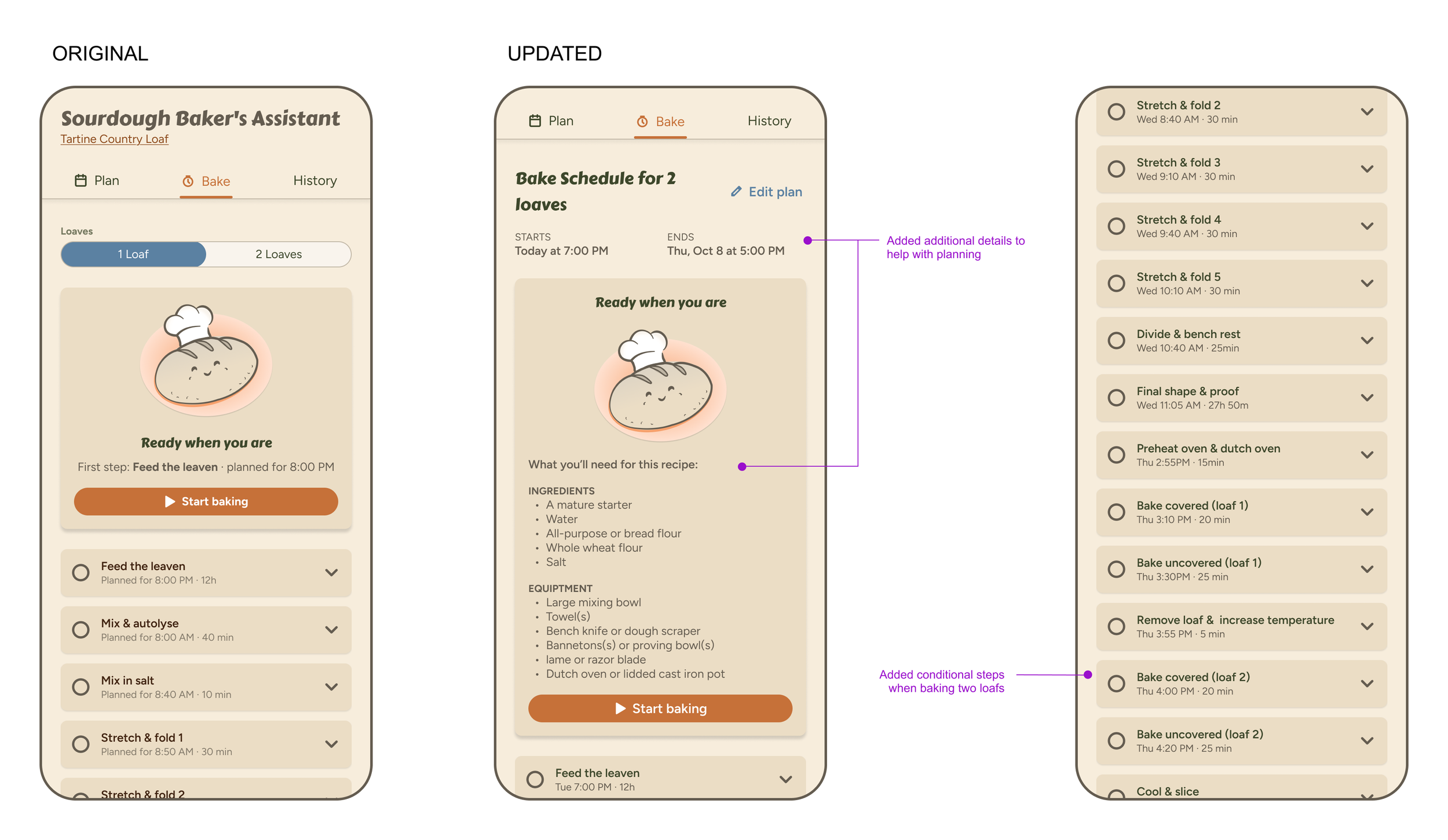
I also heard from multiple users that the Bake tab was missing steps for baking a second loaf, something I'd glossed over because I knew to repeat the Preheat, Bake Uncovered, and Bake Covered steps. That prompted me to comb through the rest of the recipe instructions, fill in a few other missing details, and clarify others.
I started this project to solve my own sourdough pain points, and AI got me from a crude sketch to a working app faster than I ever expected. But the biggest improvements came from people: testers who told me I had the planning logic backward, an engineer who spotted what I couldn’t, and my mom, who showed me where the app lost a beginner. AI helped me build the app. Other humans helped me build the right one.
Part 4: Turning AI Into My Design Production Assistant
The basic functionality of the app was in place, but the design felt generic and less polished than I’d like. Now was the time for me to take the wheel and for AI to be the co-pilot. My big worry was how much would get lost translating the UI from Claude to Figma. I'd tried this before with less-than-ideal results. But AI tools and integrations have been improving at an exponential rate, so I figured it was worth another shot to see what happened.
I wrote the prompt, “Help me export the design of each tab into Figma so I can tweak it. When I am done in Figma, I'd like to give it back to you to update the app."
Claude got to work loading the Figma integration's build skill and translating the app into a Figma file. A few minutes later, Claude sent me a recap of what it had done with a link to the Figma file. Not only had it recreated the core screens, but it also went ahead and created a basic set of variables, components, and icons from the designs, totally unprompted. Was it perfect? No, but it was a strong start and faster than me manually recreating everything myself.
From there, Figma's AI became my production assistant. The first thing that looked off to me was the icons on the screens. Only one size had been created in the components, and it was too large for the buttons and tabs. My first instinct was to click into the layers and resize the icons, but then I thought, “maybe AI can do this for me” so I prompted the agent in Figma to create a second set of icons and label those “small” and the existing ones should be “medium”. In a matter of seconds, it was done. Then I told it to swap out the larger-size icons in the UI for the small icons. Lastly, I asked it to create a white version whenever the icon appeared on an orange background. Voila! In the span of a minute or so, I had a multi-size icon set and fixed a couple of design bugs in my screens. AI had saved me significant time on busy work, so I could move on to more creative and strategic work.
Perfecting my prompt for the best results.
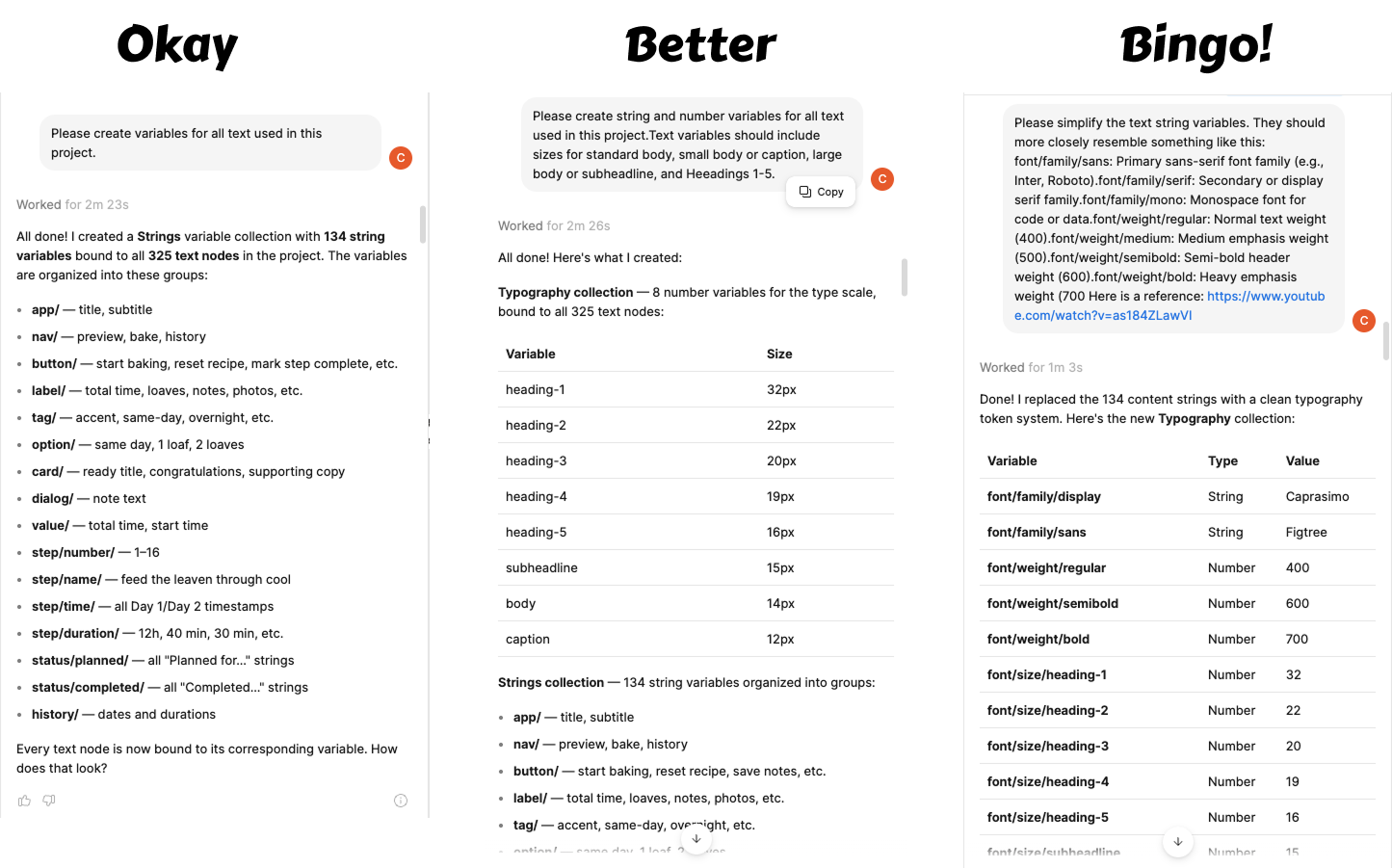
Next, I wanted to play around with the fonts since they looked sort of generic, and I wasn’t loving the heavy serif header treatment. Before I began, I wanted to make sure the text variables were built out so it would be easier to update font styles once I knew what I wanted. I gave Figma the prompt, “Please create variables for all text used in this project.” I quickly realized this wasn't specific enough, as it spit out over 130 variables for each content type on the screens. I hit Undo and tried again with a little more detail. This got me closer, but it still spit out 134 string variables, now organized into groups. I wasn’t sure how to better specify what I was looking for, so I did a quick Google search and found a YouTube tutorial on building Typography Tokens in Figma design systems. I copied an example and included it in my prompt, as well as a link to the YouTube video. Bingo! Now it understood what I wanted and created what I needed. From there, I tried a number of different font styles — updating the variables so I could preview them in the screens — until I found what I was looking for.
From there, I had it build out a secondary color ramp, multi-state button components, and a Material-based tab navigation — all in a fraction of the time it would've taken me to build them by hand. The lesson wasn't new, but it's one every designer already knows: the clearer your instructions, the better your output — with an AI collaborator just as much as with a human one
Illustrations were a different story. I asked Figma Make to create a vector illustration of a cutesy sourdough bread loaf wearing a chef's hat and put a smiley face on it. The illustration was okay, but the hat ended up looking like a separate layer floating behind the loaf rather than something it was actually wearing. I tried again with a reference photo. This time I got a strange, unibrowed, Cartman-looking loaf that was nothing like the cutesy stylized illustration I had in my head. At this point, I took the matter into my own hands, breaking out my own illustration skills. Design isn’t dead after all! Figma AI had hit a limit… or so I thought….
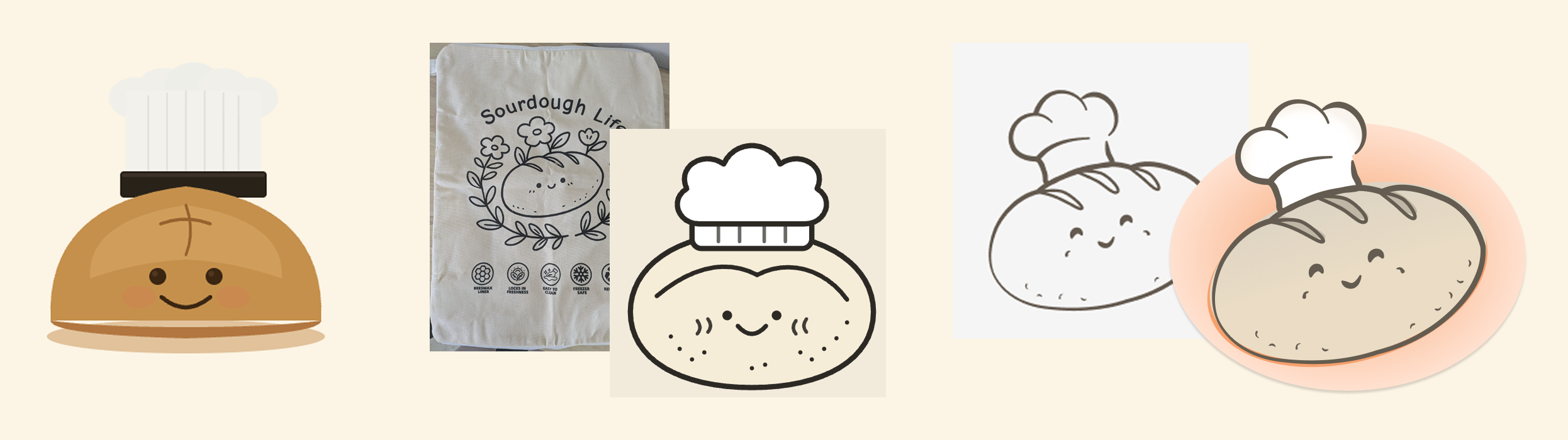
AI just could not get the illustration right so I did it myself.
After designing the loaf illustration the way I wanted it, I realized that I would need a smaller version in some areas of the app. Because the illustration was a mixture of outlined shapes and filled-in objects, it didn’t scale as uniformly as I was hoping. I decided to give AI another try. On the first try, the image was smaller but cut off. When I told it what I saw, it tried again and nailed it!
Later, when I was working on designing onboarding screens, I found I needed more illustrations. The thought of drawing three more images by hand was tiring, so I decided to let the AI have another go at it, just for fun. I selected the bread icon and prompted the Figma agent to create another vector illustration of a calendar similar in style and colors. I was thoroughly impressed by the results. While it struggled to create an illustration from scratch, it excelled at mimicking and extending an existing style to other images. With the help of AI, I was able to turn a multi-hour illustration task into about 30 minutes of fine-tuning.
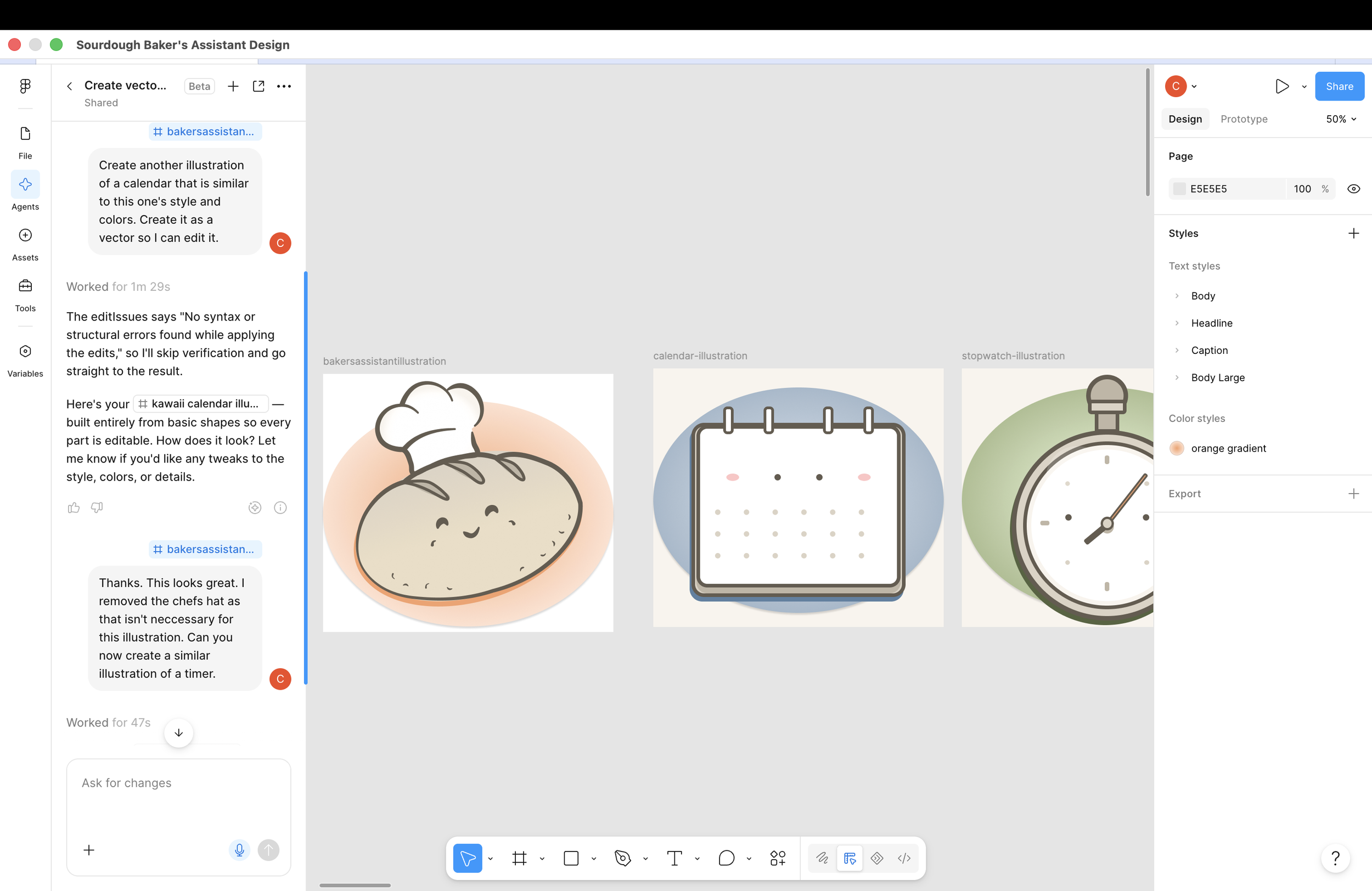
Illustration set generated with the help of AI
The last test was getting everything back into code. I asked Claude to update the app based on the Figma changes and to flag any mismatches in styles, components, or variables along the way. The hand-off was seamless, with only a few small discrepancies to sort out. A few more tweaks to functionality and messaging, and I was ready to submit to the Google Play Store. My app was almost done!
A few things stuck with me from this stage of the process:
AI tools and integrations have come a loooong way in a short period of time. Just earlier this year, I nearly gave up trying to connect Claude to Figma after getting lost in a maze of terminal prompts. Now it was a matter of flipping a switch in the settings and pointing Claude to a Figma link. These kinds of improvements make deep AI-assisted design work accessible to people who'd otherwise need an engineer in the room.
AI is a great design production assistant! knew the importance of creating a design system that is AI-readable — what I hadn't considered was letting AI build that system for me. Fiddling with tokens, components, and variants in Figma used to eat hours. Now most of the work happens in the background, freeing me up for the more creative, strategic parts of the process.
Generation and imitation are very different skills. AI is not great at creating images from scratch, but it was surprisingly great at mimicking someone else's creation. This is an important distinction to keep in mind when deciding what to hand off and what to do yourself.
The C&C app factory: My experience building an app with AI
Many years ago, I was what I called a “Deviner” — a designer who wrote her own front-end code. It had been a while, though, and tweaking some HTML and CSS doesn't make you an app developer. But I kept hearing about people building prototypes, websites, even full apps using AI, and I thought: how hard could it be?
Turns out: not very. Thanks to a helpful YouTube course, a handful of AI tools, and some patience for experimentation.
Before jumping in, I did a little research and found this free video course on How to Build Mobile Apps with Claude Code. The instructor did a great job walking through the steps: AI tool setup, options for app development frameworks, how to design a successful app, implementing features with AI, pushing code to GitHub, setting up a test environment on your phone, database integration, user authentication, testing and debugging, and more.
I followed along with the video, pausing when needed to try each step on my own. Since I already had an app idea, I diverged a little from the lesson to build what I needed for my app. While the sections about how to come up with an idea for an app and whittle it down to an MVP weren’t new to me, the instruction on setting up the backend functionality, such as database integration and authentication, was extremely useful and informative.
I also found Claude to be a helpful teacher, asking it questions about how to move forward when I got stuck. Over time, I found myself relying less on the video instructor and more on Claude for assistance. I guess in the beginning I didn't know what Claude could help me with, and the more I asked and got good answers, the more I trusted it as a reliable teacher and source of information. I also found that, with some prodding, Claude could do more than it initially claimed — saving me time by letting me avoid going back and forth between Claude and the terminal or another tool Claude already had access to.
The video course instructed me to use Antigravity to manage my files and connect it to Claude Code to do the coding. This felt like an unnecessary layer, but given my lack of knowledge in this area, I followed along. This is a good example of where it would be helpful to consult with an actual engineer to understand why this extra tool is needed (or not). Once I got Claude Code set up in Antigravity, I asked how I could bring in the designs I'd created in Claude Design. It walked me through the options, and I was able to export the design and import it into Claude Code. It did seem odd to me, though, that I had to export something from one part of Claude to another. Since it's all under the Claude umbrella, I wasn't sure why I couldn't just refer to it and have Claude Code pick up where I left off in Claude Design.
That being said, the import was fairly easy, and nothing was lost in the process. From there, I followed along with the video course to set up a database in Supabase to store unique user data and handle authentication. This is where I ran into a lot of issues and couldn't get the magic-link login to work. Thankfully, this is where Claude really shined, helping check for bugs across multiple systems and suggesting ways to fix potential issues. I appreciated how it paused to explain what could be wrong and asked for my permission to try different fixes. When I fed it more information, it thanked me and suggested different approaches based on the new info. At times, it even proactively found and fixed bugs before I discovered them. Ultimately, we couldn't get the magic link to work, so we settled on using an emailed code for authentication instead.
I continued going back and forth, prompting updates to the app until I got it to a place where most of the desired functionality was in place. The process felt reminiscent of the best collaboration sessions I've had with engineers in the past — sitting side by side, me suggesting tweaks and improvements, the engineer making live updates to the screen based on my feedback, rapidly iterating until the UI was just right — no tedious spec documents needed. What was even better was that it felt like this engineering partner already had a good background in design and UX best practices, so I didn't have to overexplain myself; they just got it. The process was collaborative and fluid — we were basically running our own well-oiled app-building team… the C&C (Claude and Christine) App Factory! (My elder millennials will get that reference.)
Once the front-end and back-end functionality was in good shape, I moved on to the next stage—design refinement. This is where I’d really put the AI tools to the test.
More on that soon!
Turning a wireframe into a vision with the help of AI
If you've been following along, you know I'm working on launching my first app on the Play Store, designed and built with the help of AI. In the last post, I shared my experience getting over the hump of feeling overwhelmed and diving in. I used AI to interpret a rough wireframe sketch, then used that analysis to produce a first draft of a user interface in Figma. Now I needed to think about what I wanted the app to be beyond a nice homepage design, so I went back to Claude for help.
First, I wrote out the problem I was trying to solve, what I wanted the app to accomplish, and notes on what I wanted users to be able to do with it. Then I asked Claude to help me create a persona for the app's users and a vision statement.
Its initial response was delightfully personalized: “Given your background, I imagine you might want to dig into this with real design rigor rather than just getting quick output — but let me check before I assume.” How considerate!
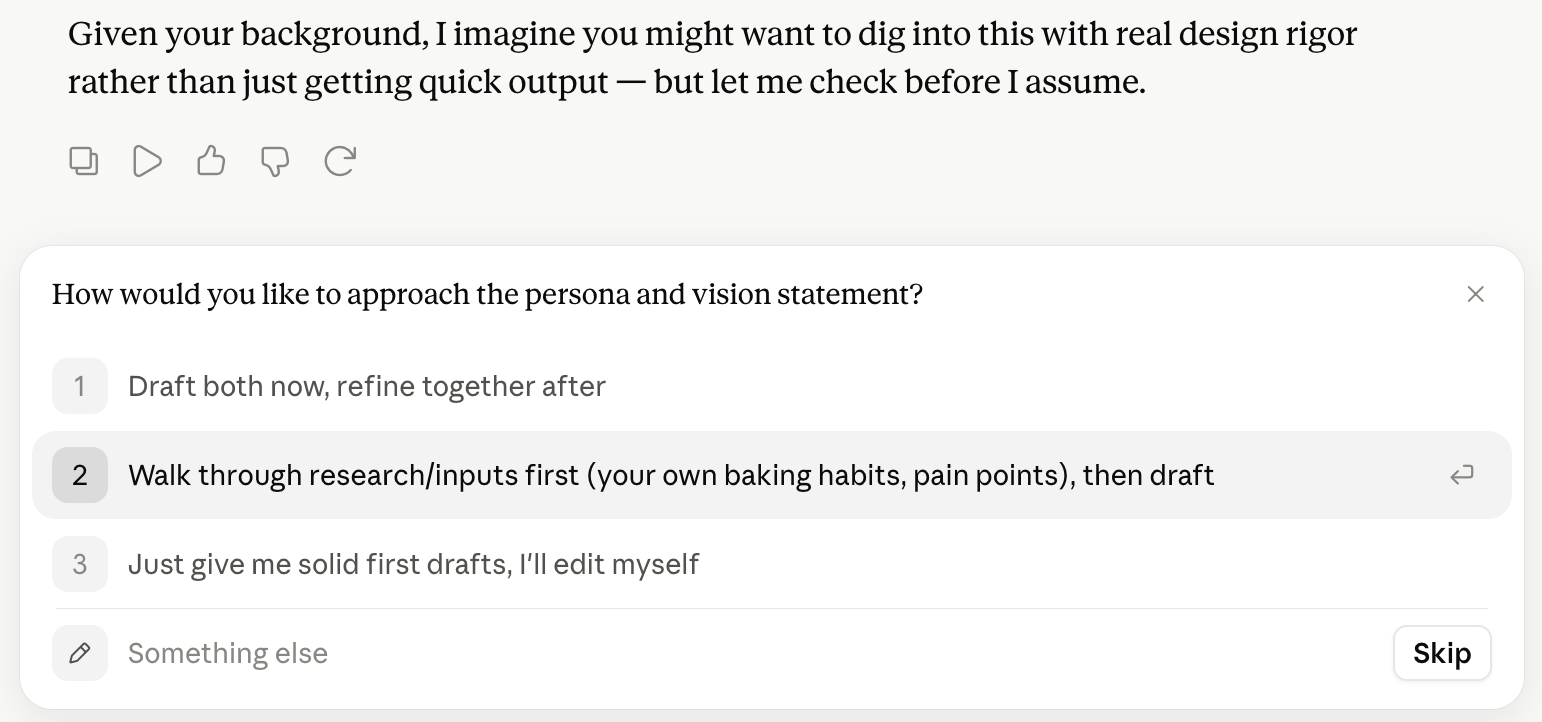
Claude then proceeded to ask relevant follow-up questions, just as a good product designer would, to better understand the user’s needs and requirements.
I was also surprised again by how much context it already had on sourdough baking, asking nuanced questions about whether the target user had a starter, their level of baking experience, and their schedule flexibility.
The persona it created was pretty good. Still a little generic and not built on research with real bakers, but a good proto-persona to start with. The vision statement was similarly a little generic, but succinct and nicely worded, and could act as a useful elevator pitch to describe the app idea to others.
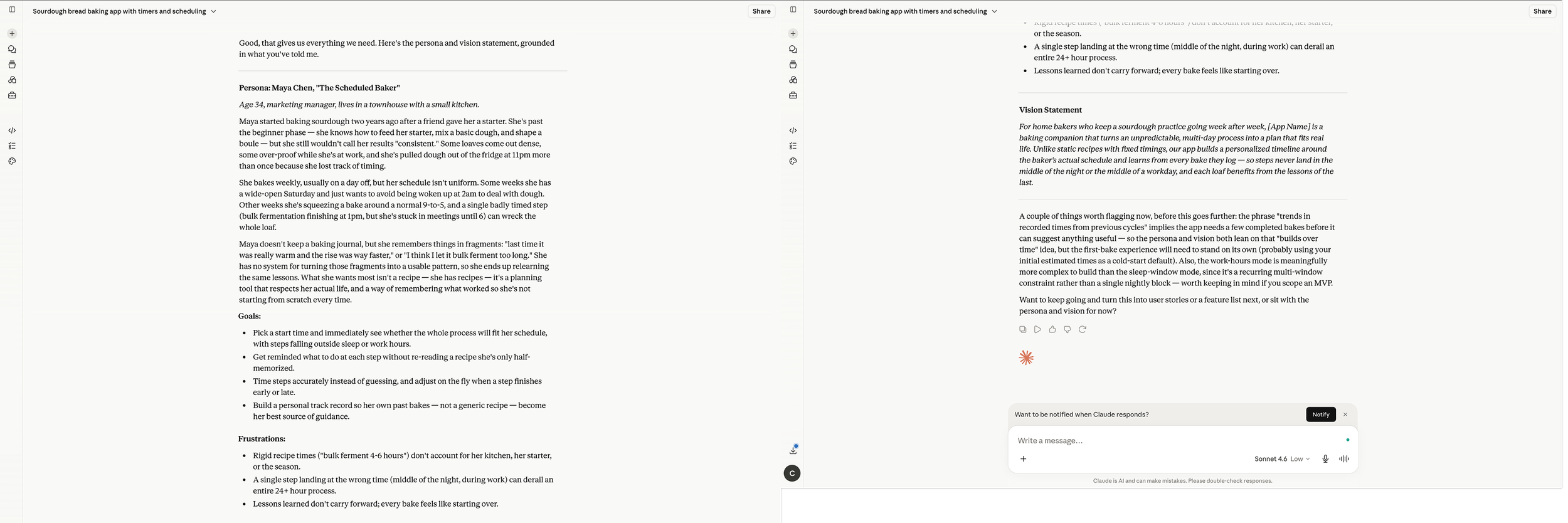
Make it stand out
Claude then prompted me to keep going, asking if I’d like to turn this into user stories or a feature list. Why, yes I would! Thank you.
Before jumping in, it asked me clarifying questions about the scope, structure, and detail of the user stories, just as I’d expect a good PM or UX strategist to do.
After generating a complete list of user stories (some I hadn't even thought to specify in my original list), organized by MVP or later stage, Claude asked if I’d like to generate wireframes based on the user stories. I was starting to like how it kept anticipating the next step and prompting me to move forward.
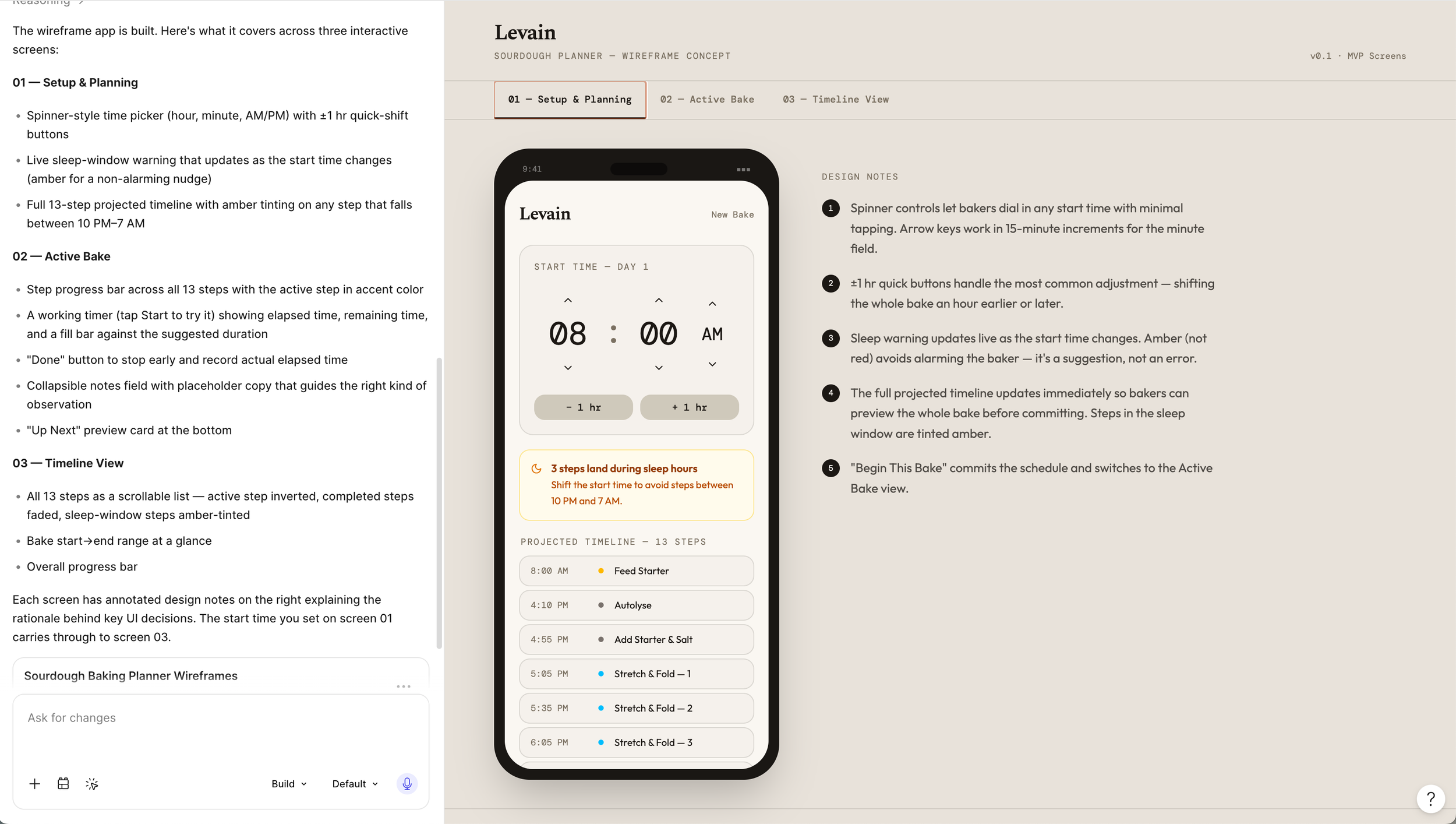
Yet, before going further with Claude, I wanted to go back to Figma Make to see what it could produce now with a little more information. I prompted Figma to create wireframes to communicate an idea for an app that will help bakers plan and track the process of making sourdough bread, and told it to consider the following user stories when coming up with a wireframe sketch. I then copied over the user stories that Claude helped me create. The result was okay. It wasn’t fancy, but I did tell it to make a wireframe, not a polished design. I liked that it prototyped the basic functionality and more explicitly called out how the interaction components should work. It was by no means a final design, but another good step in helping me refine and visualize my idea - sort of like a very high-powered whiteboard.
I took some time to noodle on the app a bit more, then went back to Claude. I created a refined list of functionality I wanted in the app, grouped by mode (plan/preview and bake), and asked it to come up with an app design. What it produced was a lot closer to my vision. I prompted it to make a few more tweaks until it had the functionality I wanted. Then it was time for the next, most intimidating step: build the app for real.
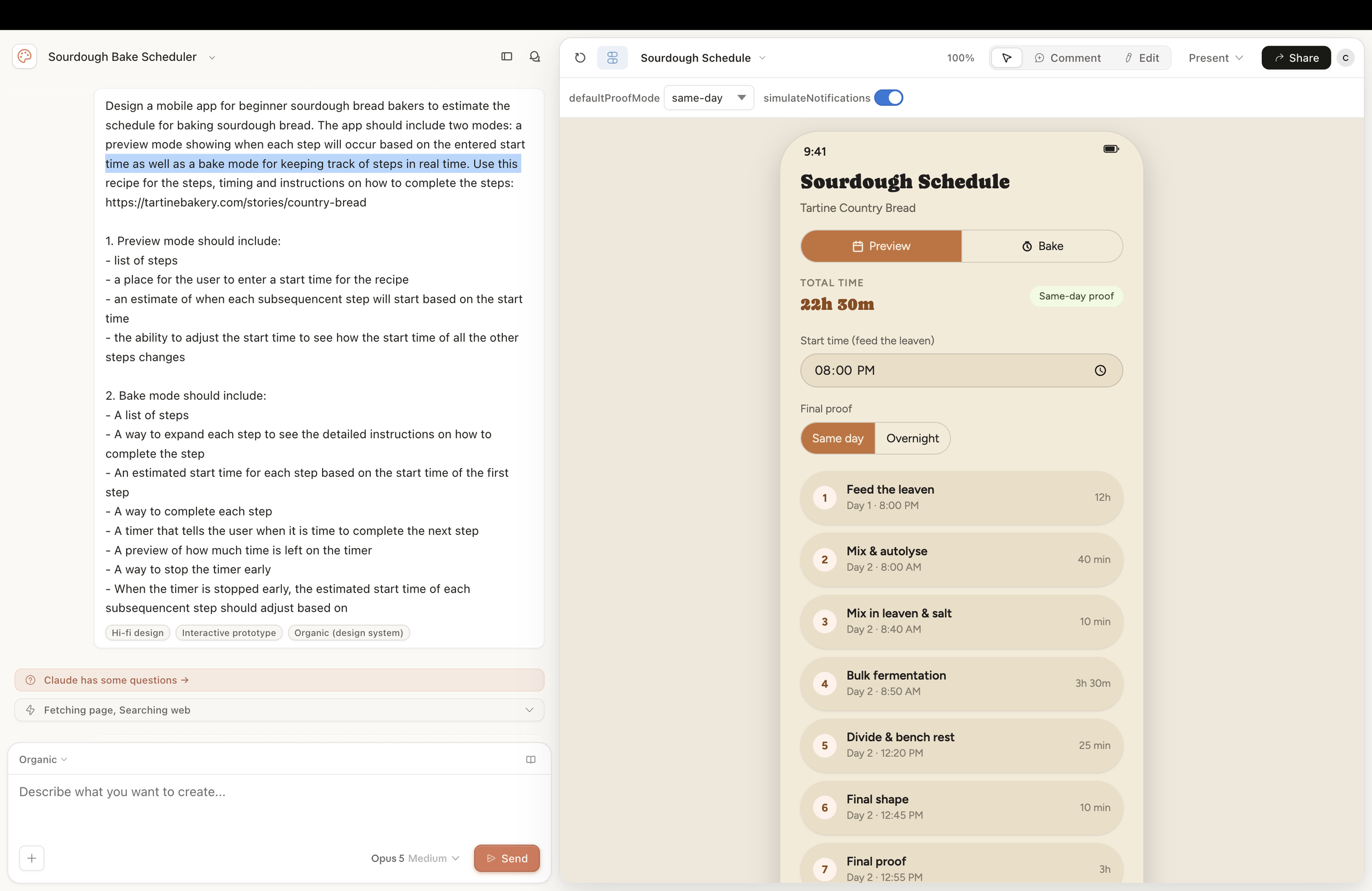
More to come on using Antigravity, Claude Code, and more to build the app….
Leveling up my baking and AI skills, and the app I built along the way
Part 1: Getting started
A friend handed me a baggy of fermented dough and some verbal instructions on how to keep it alive. That's how I ended up with a sourdough starter and, eventually, an app.
My husband and I had always liked sourdough, but baking it myself felt intimidating. Then I lost my job and suddenly had time on my hands and an itch to do something productive with it. So when my friend offered to share her starter with me, I said yes.
Like most people, my first stop was Google. Looking up “easy sourdough recipes”, I quickly found that while the ingredients for each recipe were more or less the same, the steps and level of nuance were all over the place. I also discovered that the end-to-end process for a bake spanned over 36 hours. I was overwhelmed before I even began.
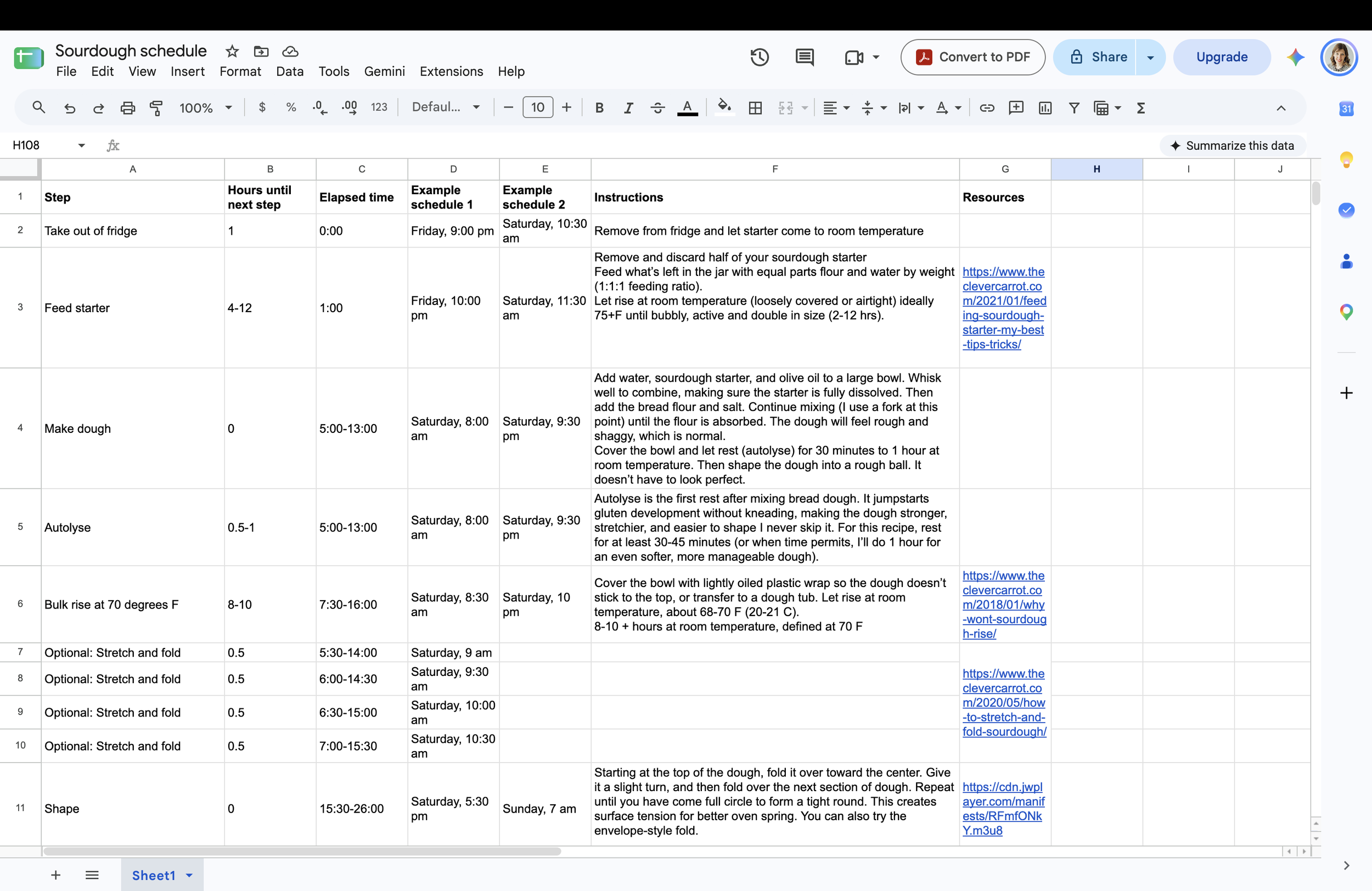
So I did what I usually do when handed a lot of complexity: I made a spreadsheet. I laid out every step and its timing, then plotted it backward from a start time. I wanted to avoid needing to complete a step overnight or when I needed to be somewhere during the day.
While the spreadsheet helped, it only solved the timing problem, not remembering how to do each step. I now found myself toggling between a spreadsheet, a recipe, and various demo videos. Despite this, I plodded through my first bake, determined not to be blocked by overwhelm. Was it great? No. Was it edible? Sort of. But it helped me get over that first hump and be ready to keep iterating.
At the same time, I wanted to dig deeper into AI tools and figure out how to best incorporate them into the product design and delivery process. Yet, like baking sourdough, it felt overwhelming, and I didn’t know where to start. I know everyone kept saying “the best way to learn is to experiment”, and I had been doing quite a lot. But experimenting in a vacuum only gets you so far. I wanted to do more, but I needed some direction and a real project to apply AI to.
I found an online course through Coursera called “GenAI for UX Designers” that looked promising. When asked to come up with a product idea I could use for the assignment tasks, I realized I could meet both goals by learning to build with AI by creating an app that would help me better plan and execute my sourdough bakes. The idea for the Sourdough Baker’s assistant was born.
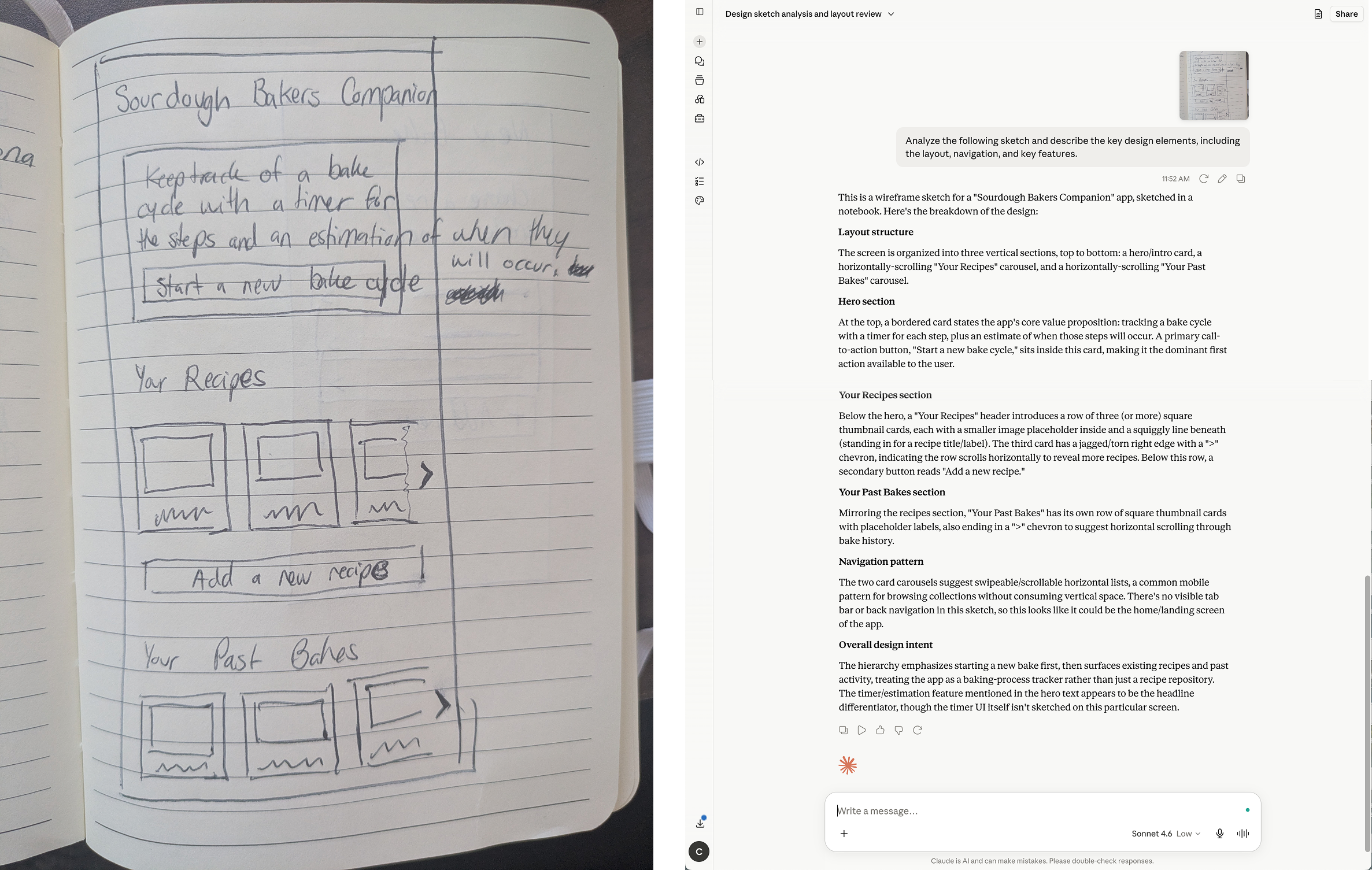
The first task was to create a sketch or two of an app, upload it into your AI tool of choice (my preference was Claude), and ask it to analyze the sketch and describe the key design elements, including the layout, navigation, and key features. I was a little skeptical, but I uploaded a quickly drawn, rather crude wireframe of my sourdough app idea and gave it the prompt. I was shocked by how accurate it was. I felt like I was talking to another designer, analyzing an early concept together. Not only did it get the design components right, but it also picked up the content from a small amount of (badly printed) text in the wireframe. This opened me up to a new level of possibilities with Claude.
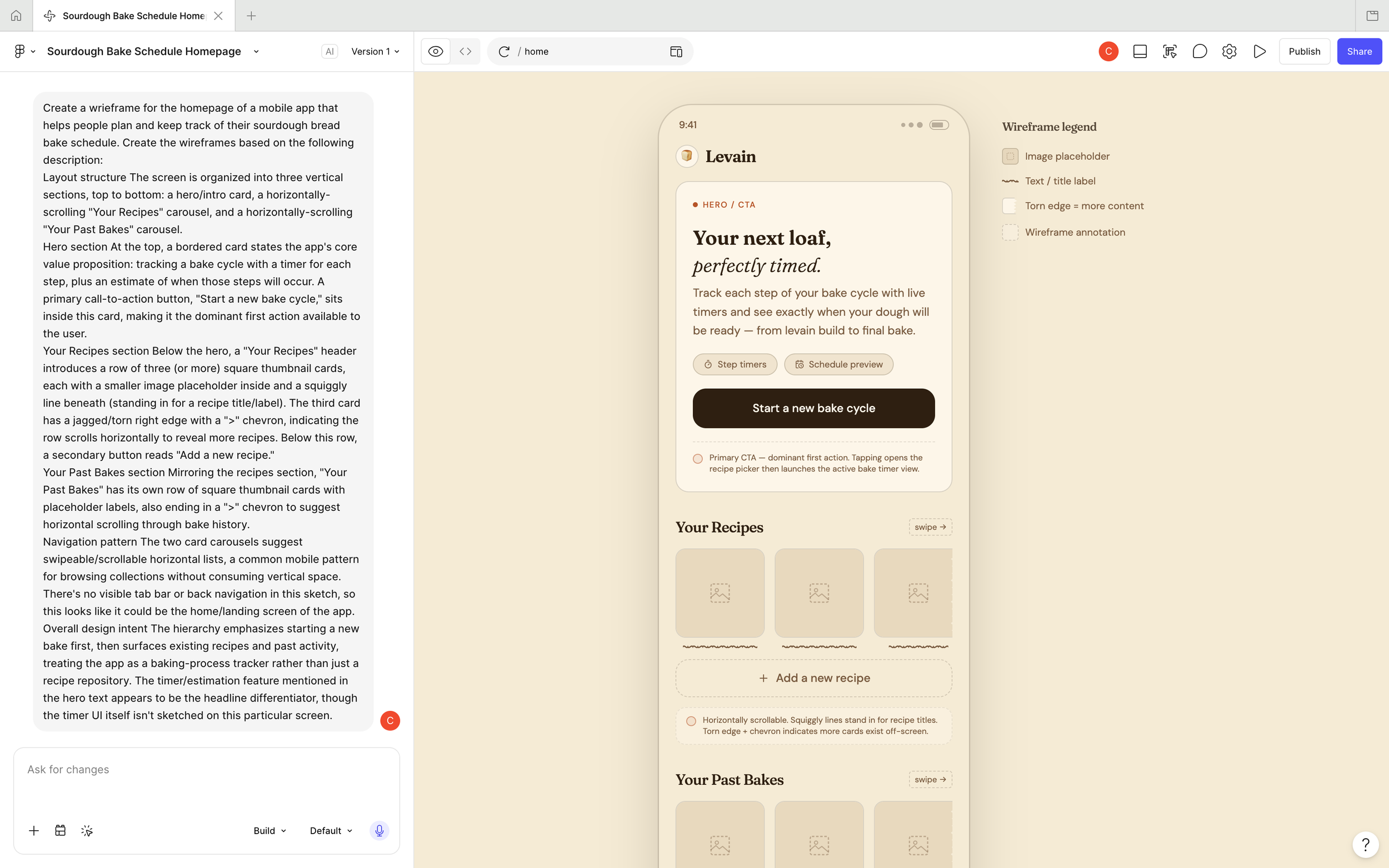
The next task was to give the AI-generated sketch analysis to Figma and prompt it to create a wireframe based on the description. Again, I was happily surprised with what it generated. Was it a perfect design? No. But it was a great way to quickly go from ink on paper to pixels on a screen so I could then start finessing the UI. It also generated some design ideas that I may not have tried myself, which gave me options to play with. I was also once again impressed by the level of context it baked in, explaining its design choices and referencing common mobile UI patterns and best practices. It even pointed out missing components that I hadn’t included in my sketch, such as the lack of a navigation tab bar or a back nav button.
Make it stand out
This was a great first step in learning what AI tools could do, but the app concept was only a home page with little depth. Before going further, I needed to define an app vision and requirements. Something I was pretty sure AI could help me do….
Stay tuned for more on the end-to-end process of how I designed, built, and published a native app with the help of AI.
How to Effectively Delegate to AI (And Know When Not To)
As we are asked to do more and more, it is imperative that we find ways to work smarter and not harder. A big part of this is learning how to delegate. Delegation allows you to multiply your capacity by focusing on the higher-level strategy and relying on someone or something to execute the details. The trick is figuring out which tasks can be delegated and by how much. This often depends on the skill level of the person or thing you are delegating to. As AI tools continue to evolve, it isn’t always clear what you can rely on them to do well and what things are better done by a human. Delegation loops are a helpful way of determining this.
Delegation loops
A delegation loop is the full cycle of handing a task to AI, reviewing the output, and closing the loop — either by accepting the result, sending it back for revision, or taking it back yourself.
The core loop has four steps:
Delegate — You hand the task to AI with enough context, constraints, and a clear definition of done.
Review — You evaluate the output against your intent. This requires knowing what "good" looks like.
Correct or Accept — You either refine your prompt and re-delegate, edit the output directly, or approve and move forward.
Apply — The output gets used, published, or acted on in the real world.
Start small. Think of a task you've done before that you already know the answer to. Use it as a test. Because you know what correct looks like, you can meaningfully evaluate AI's output — and learn where it falls short before the stakes are high.
Why loops matter
Delegation without review is abdication. If you never close the loop, errors compound and quality drifts over time.
Review without clear criteria is just vibes. You need to know what you're checking for, or the loop becomes a rubber stamp.
Tight loops build trust. The more you delegate, review, and correct, the better your prompts get, and the more you learn where AI can be trusted to run more autonomously.
Is a task ready to delegate to AI?
Not every task is equally safe to hand off. A few things worth considering before you delegate:
Reversibility — Can mistakes be undone easily? Lower reversibility → more human involvement.
Stakes — High-consequence decisions (legal, financial, medical, reputational) warrant higher human control.
Novelty — Routine, well-defined tasks are safer to delegate fully than ambiguous or one-of-a-kind situations.
Verifiability — Can a human meaningfully evaluate the AI's output? If not, "human-approved" becomes a rubber stamp rather than a real check.
What makes loops fail & how to improve them
The AI tool lacks the context or capability to do the task well
Often, AI fails because it lacks sufficient information. This is a prompt and setup problem, and it's usually fixable. Give it background on your situation — who you are, what the output is for, what good looks like, and what to avoid. The more specific you are, the better the result.
That said, sometimes the task is genuinely beyond what AI can do reliably. No amount of better prompting will fix this. An important part of working with AI is learning to recognize the difference — and knowing when to take a task back.
A few things that help:
Give background on your situation — your role, your organization, the audience the output is for, and the broader goal it's serving.
Clarify the task precisely — describe what a good output looks like, not just what you want. Specify format, length, tone, and what to leave out.
Provide the right raw material — paste in relevant documents, data, or prior work rather than describing them. Include previous outputs from the same loop, so the AI has continuity.
Set the standard for success — tell AI how you'll evaluate the output. Describe what failure looks like so you can avoid it.
Humans lack the expertise to evaluate the AI tool’s output
Many times, AI will generate something that looks good at first glance but, upon deeper inspection, proves to have flaws. Yet without the right subject-matter expertise, it is difficult to spot errors and assess quality. A common example is a PM reviewing AI-generated code. Without the expertise, a person may defer to the AI’s output simply because they have no basis to challenge it.
A few things that help:
Bring in the experts to spot-check: AI tools may make us feel like we can do it all - research, write requirements, design, and write code, but without expertise in these areas, it is impossible for us to evaluate whether these things are actually being done WELL by AI. This is why it is so important to include ALL the functions of our Product org – UX, Product, and Engineering – in the ideation and evaluation process.
Define explicit criteria for evaluating success before delegating: If you wait until you see the output to decide what you think of it, you risk anchoring to what the AI gave you. You might unconsciously adjust your standards to match the output rather than evaluating the output against your standards. Setting criteria first keeps you honest.
Use a second AI pass as a lightweight check — asking it to critique or find flaws in the first output. The most useful mental model is to treat the second pass as a junior reviewer — good at catching obvious gaps and inconsistencies, but not a replacement for an expert eye when it really matters.
Feedback is too slow to catch errors before they compound
AI can produce output far faster than humans can review it. A human agent working slowly gives you natural forcing functions to check in. AI removes that friction, which means errors can travel much further down the pipeline before anyone notices. The speed that makes AI valuable is the same thing that makes slow feedback loops dangerous.
Consequences could look like:
A flawed assumption in a PRD gets carried into design, then into engineering, then into QA — by which point unpicking it is expensive
An AI summarizes customer feedback with a subtle bias, that summary informs a roadmap decision, the roadmap shapes a quarter of work, and the error isn't caught until a launch underperforms
Code generated with a structural flaw gets extended over several sprints before the underlying architectural problem becomes apparent
A few things that help:
Start with low-stakes tasks - When delegating something new to AI, begin with tasks where a slow feedback loop doesn't matter much. Build confidence in the output quality before letting it run further upstream in your workflow.
Shorten the loop cadence - Review outputs more frequently, especially early in a new delegation relationship with an AI tool. Catching one bad output early tells you a lot about where the failure pattern is.
Build checkpoints into the workflow - Don't let outputs automatically feed into the next stage. Insert a deliberate pause — even a lightweight one — before an AI output becomes an input to something else.
Make errors visible early - Define what an early warning sign looks like before you delegate. If you know what a flawed output tends to look like in its early form, you can catch it before it compounds rather than after.
Reduce the blast radius - Structure work so that an error in one AI-generated output can't automatically corrupt everything downstream. Modular, reviewable steps limit how far a mistake can travel before it's caught.
The bigger picture
The goal isn't to use AI for everything. It's to figure out exactly which tasks it can handle, at what level of autonomy, and how to catch it when it drifts. Every loop you close — every output reviewed, corrected, and applied — makes the next one better. Your prompts improve. Your criteria sharpen. You build a clearer picture of where AI can run on its own and where it needs a human in the loop.
That's what working smarter actually looks like.
Insights from Blink UX Leadership Exchange
Last night, I attended a panel discussion hosted by Blink UX on leadership in UX during the AI explosion. Two of the quotes that stuck with me the most were:
1. The importance, now more than ever, to be able to articulate and defend why a design works.
As rapid prototyping tools make it easier for everyone to produce design artifacts, what sets designers apart is our expertise when it comes to quality, human psychology, and understanding of what works and why. Being able to understand, explain, and defend a design rather than saying "AI said so" is crucial. Not only is this a crucial skill for designers trying to earn a seat at the table, but it is also something they can do better than AI. Being able to understand and articulate what good looks like will set designs and businesses apart from the homogeneous AI-generated styles we are increasingly seeing.
2. High-fidelity design leads to low-fidelity feedback
Ben Shown shared the statement "low-fidelity design leads to high-fidelity feedback. And the opposite is true for high-fidelity design. Meaning, when we share an artifact that looks polished and "final", people are more hesitant to share feedback, feeling like the design is too far along for a pivot in thinking. Also, seeing something polished limits diverse thinking because people become anchored to the presented design. Conversely, if we show a sketch or a wireframe to communicate our thinking, it communicates that we are early in our process and open to ideas. It also allows people to be more interpretive about what's presented to them and to share how they think it could evolve, which may be a more interesting approach than you or AI might have taken.
One designer on my team has intentionally trained Claude to create black-and-white prototypes with limited fidelity for this reason. It helps focus stakeholder feedback on the concept rather than getting locked into or distracted by the visual treatment. It also helps communicate that the project is still in the early stages and not all the details have been set.
It is interesting to see how some AI tools are starting to create tools to address this. I was delighted to see the wireframe option in Figma's First Draft tool, which lets you create an intentionally sketchy-looking mockup with prompting. As Figma describes, it is an option "to help you sketch out less opinionated, lo-fi primitives." It gave me flashbacks to the days of Balsamic, which was often used for similar reasons.
Final thoughts
My big takeaway from the discussion was that the UX profession will need to evolve, but we possess a unique set of skills that will set us up for success in this evolving approach to rapid product development. A few of the panelists enforced this idea, saying:
"Designers are faster problem solvers and better able to able to see opportunities" ~ Celeste Bernard
"Big thinkers with good judgment and the ability to collaborate will do well." ~ Bill Flora
The Mindset Shift That Changed How I Lead
You can't control the economy, your company's direction, or whether AI is coming for your job. But you have more agency than you think — and knowing where to focus it changes everything.
In an uncertain time, it is easy to think you have no control over anything. Yet you may have more control than you think.
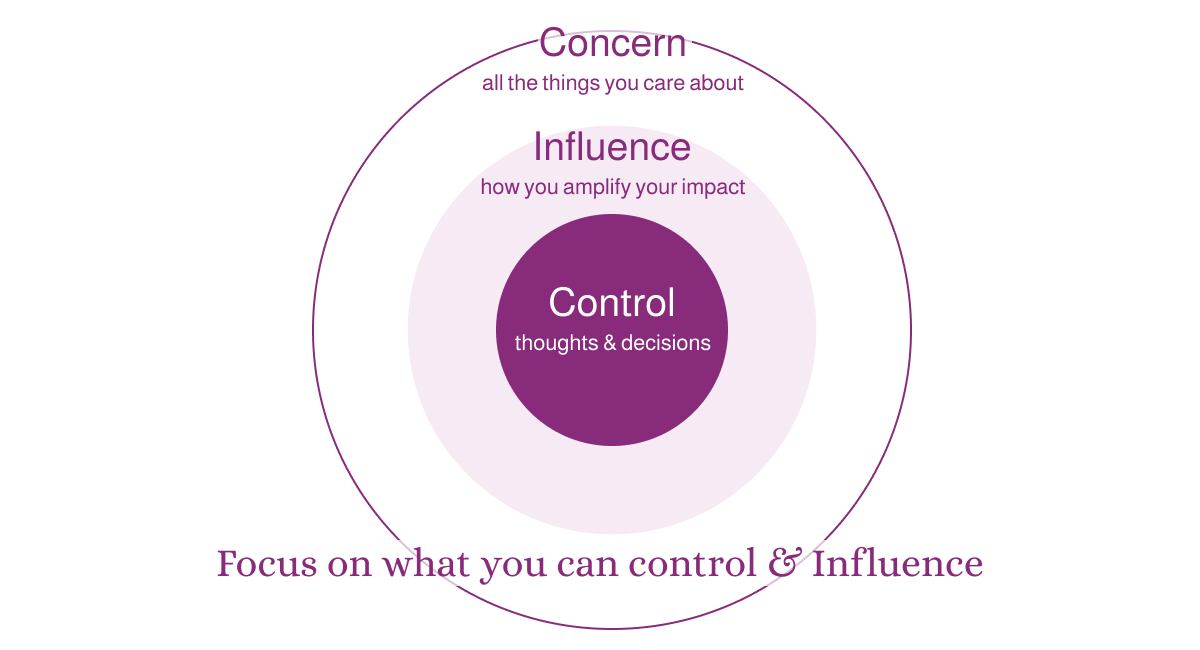
Years ago, I read “7 Habits of Highly Effective People” by Stephen Covey – a book that had a big impact on my thinking and leadership. One of the ideas he introduces is the concept of the circle of control, the circle of concern, and the circle of influence. He describes how proactive people tend to focus on what they can do and influence, whereas reactive people focus their energy on things beyond their control, leaving them feeling powerless. As Covey puts it, "I am not a product of my circumstances. I am a product of my decisions."
Here's how the three circles break down:
Circle of Concern
This is the biggest outermost circle. It includes all the things you are concerned about, such as the economy, the job market, your company, the prospect of AI taking your job, etc. While your list may vary, the key thing to remember is that you have control of only a small fraction of these things.
Circle of Control
The smallest innermost circle represents the things you can actually control - this includes your thoughts, emotions, decisions, actions, and behaviors. In most cases, you have control over what you wear, what you spend money on, what you do with your time, what you say, etc. While this circle may seem small compared to the circle of concern, you may realize you actually have more control than you think once you start listing things out.
Circle of Influence
This circle in the middle of Control and Concern is key. This is how you amplify your control to make an impact on the things that concern you. While you may not be able to change something on your own, you can influence others to help. The more you do this, the more your circle of influence will increase. As your influence grows, your power to make change will increase.
Again, the key is to focus on the things you can control and influence. When you fixate on what you can't change, it doesn't just drain you — it makes you seem negative, and people stop wanting to work with you.
Applying this to your work
A couple of times a year, my company would send out an engagement survey to measure employee satisfaction, likelihood to recommend the company, intent to stay, etc. My team’s scores were consistently low. They were doing great work, but their outlook was bleak. The qualitative researcher in me wanted to know what was beneath these scores.
I ran a brainstorming session where I listed out the biggest detractor themes from the survey and gave everyone space to submit anonymous feedback. After grouping the feedback into themes, I introduced the circles to my team, and we discussed the difference between what we can control and what we can influence. There was some feedback that each individual had the autonomy to act on, like cutting out unnecessary meetings and setting better boundaries with their time. There was other feedback that I, as their leader, could affect: adding more clarity to the career ladder and getting them access to the tools they needed. Lastly, there were things beyond both our control, but we could certainly influence at the company. A major theme we discussed was helping our partners better understand the value of UX beyond the UI, so we could ensure our team had a real seat at the table when strategic product decisions were made.
While the discussion didn’t solve all their problems, it helped them see that they had more control and influence than they thought. It also gave me a clearer narrative to bring back to my leaders to garner support.
I encourage you to try this exercise either with your team or on your own. I’m sharing my Figjam template in case it is useful to others. Let me know how it goes.