
From Preview to Plan: redesigning the planning to better fit around bakers’ schedules
One of the biggest pain points I was trying to solve with the app was planning my baking schedule so I wouldn’t have to get up in the middle of the night to complete a step. Before the app, I used a spreadsheet to figure out my bake schedule. I entered a start time and plotted each subsequent step based on the wait time between them. If the schedule didn’t work, I adjusted the start time until the other steps aligned with my schedule. The first version of the app followed the same paradigm, with the start time as the only editable field, generating a preview of the schedule.
As I kept baking, I realized the timing between some steps is flexible, especially the final proof, so I made step durations editable in the Preview tab. Unfortunately, this proved to be confusing, especially for new bakers who didn't know which timings were flexible and which weren't.
“I'm not sure I understand what the use case is for only being able to toggle step duration. Editing a recipe probably happens less frequently.”
Because the Preview tab also presented steps almost identically to the Bake tab, testers found it repetitive.
“There's not really a meaningful difference between the preview and the bake tabs. Seeing all the steps and then seeing all the steps again feels redundant.”
Then one tester pointed out that I was thinking about the process backward:
“I think you're onto something with the planning, but typically my constraints are when I'm home and awake. When I think about baking bread today, I am often working backwards from an end time, rather than forwards from a start time.”
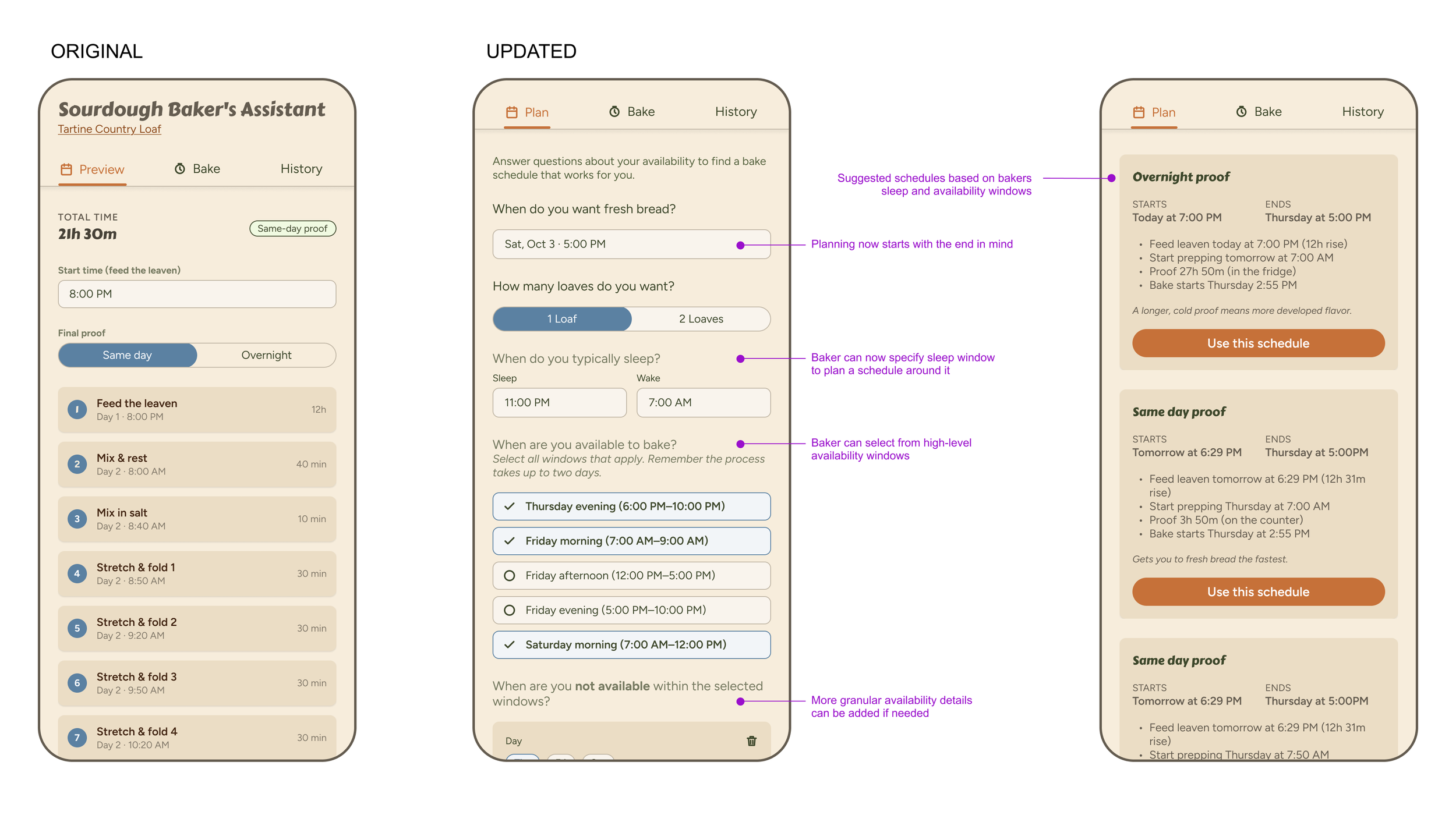
This reframed the whole planning problem. I dug deeper into this idea and started fleshing out how I could capture key details about a user’s schedule to create a better baking schedule. I also wanted to add more logic for where timing between steps was flexible, giving users more bake schedule options.
I went back to Claude Code, summarized this feedback, and asked for a few different approaches. We worked together to refine the concept and update the prototype, again laying out the functionality before moving the screens into Figma. There, I refined the visual design and wording before moving back into Claude to update the build and check for bugs. This new planning workflow proved much more complicated, with multiple variables and pieces of logic working at once. I went back and forth with Claude, testing edge cases, reporting bugs, and cleaning up the logic until everything worked smoothly.
Refining the target persona
Then I tested with my Mom. She didn’t get it. Since she had never baked sourdough bread and didn’t realize that the process can take over a day and a half, she completely missed the point of the plan tab. At that point, I needed to ask myself who I was designing the app for. I knew it wasn’t just for me, but was it targeting everyone from complete novices to expert bakers, or a smaller set of personas in between? I knew designing for total beginners would require much more hand-holding and education, something I wanted to explore in the future, but it wasn’t in scope right now. I also knew that catering to expert bakers would require a whole different level of detail and specificity. For now, I decided to optimize the app for someone like me, someone who understands the basics but needs help with planning and timing. If there were simple ways to make the app friendlier to beginners or pros, I'd take them, but I wouldn't go out of my way to optimize for either extreme.
Making content more scannable and accessible
One easy win for beginners was making the text-heavy recipe instructions easier to scan, using design fundamentals like information hierarchy, spacing, and varied font sizes and weights.
“For the "Bake Uncovered" section, I missed the instruction to lower the oven temperature... When I was skimming the instructions, I was specifically looking for numbers (temperatures and times) and when I didn't see any just skipped right over the rest of the text.”
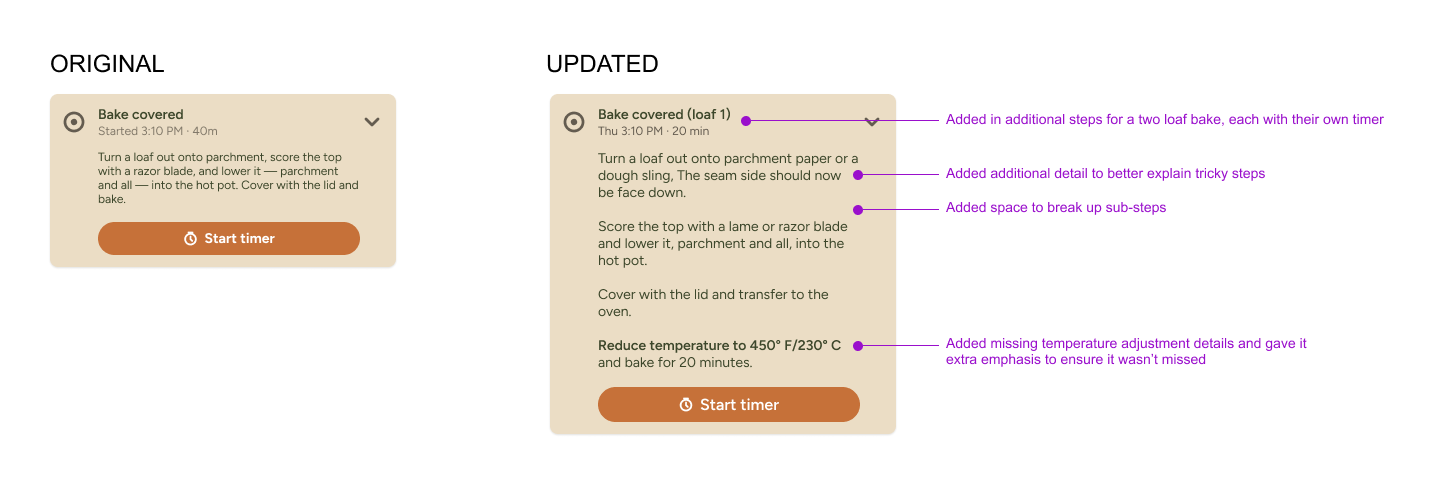
I also removed unnecessary labels and descriptions and simplified jargon that wouldn’t make sense to beginners.
“The app seems to assume a certain level of familiarity and understanding of sourdough terminology, which I definitely do not have as a beginner! I had to Google what "autolyse" meant.”
Catching bugs and missed details
One of the best parts of testing is getting a fresh pair of eyes on your work. As a designer, it is easy to go heads down and develop tunnel vision, missing obvious details because you are so used to looking at the design. On a cross-functional team, those things usually get caught before release by other designers in a design review, PMs during refinement, or engineers as they build. Yet when working alone with AI, the process can quickly become an echo chamber. That’s why I firmly believe that while AI can be a powerful tool to speed up our individual workflows, we still need other humans to lend their expertise and act as a sounding board.
App size is a good example. An Engineer friend pointed out that the app package seemed unusually large for what it was, and there was probably an opportunity to refactor it. As a non-app developer, I wasn't measuring app size, but I realized it affected download speed, so I knew I needed to reduce it. When I asked Claude Code about reducing the file size, it suggested enabling R8 code shrinking, but it explained that it required a config change, a rebuild, and testing, since it can trip up edge cases. That felt heavy and risky. Is it worth it? I don't know, and this is exactly where an engineer's expertise would come in handy. Any engineers reading this, please help me out!
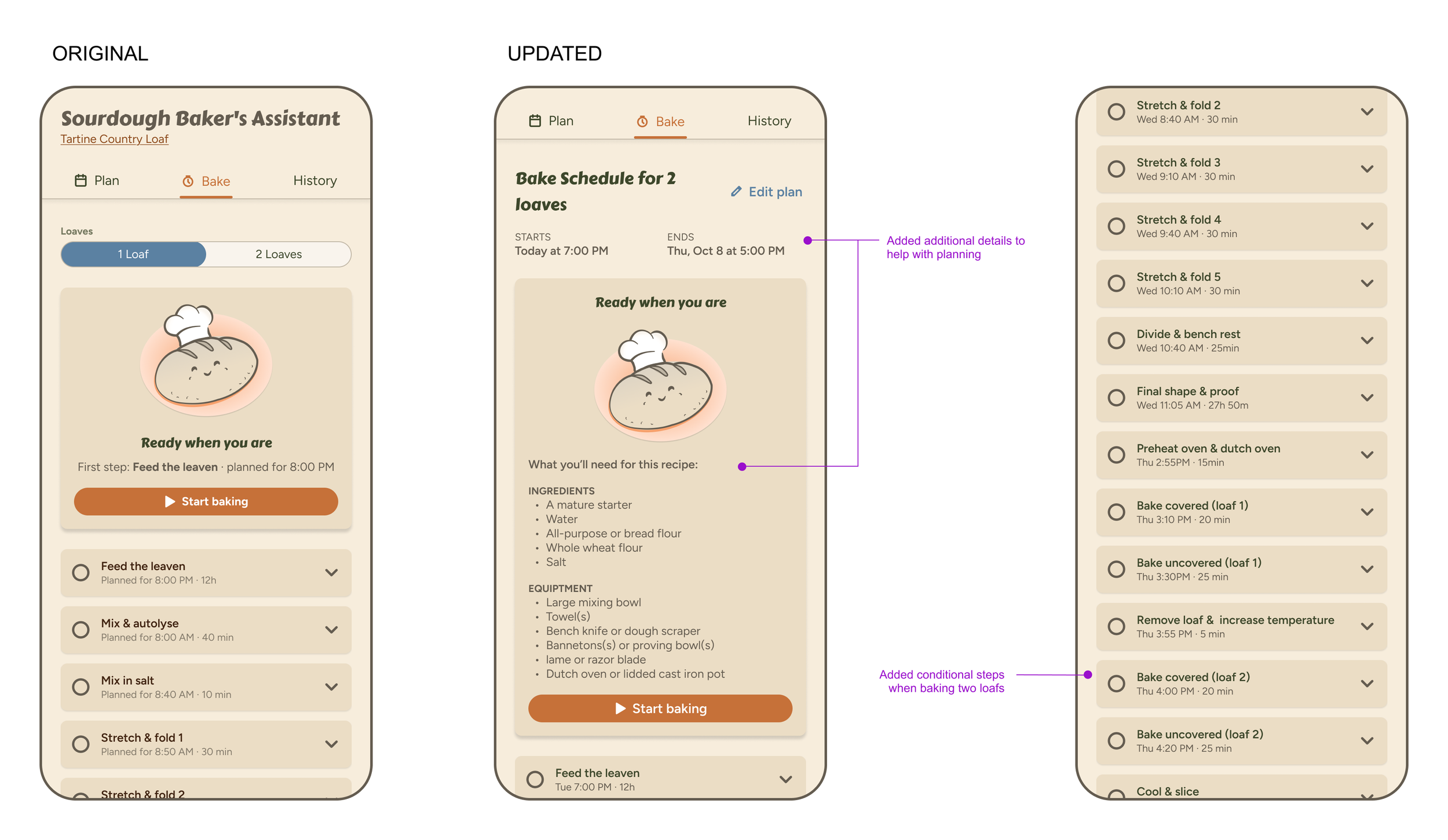
I also heard from multiple users that the Bake tab was missing steps for baking a second loaf, something I'd glossed over because I knew to repeat the Preheat, Bake Uncovered, and Bake Covered steps. That prompted me to comb through the rest of the recipe instructions, fill in a few other missing details, and clarify others.
I started this project to solve my own sourdough pain points, and AI got me from a crude sketch to a working app faster than I ever expected. But the biggest improvements came from people: testers who told me I had the planning logic backward, an engineer who spotted what I couldn’t, and my mom, who showed me where the app lost a beginner. AI helped me build the app. Other humans helped me build the right one.